Our website contains links to partner sites. If you click from our site to the partner's site and purchase their services there, we will receive a commission for mediation (Find out more information). This form of cooperation does not affect the objectivity of our reviews. With each purchase made through links from our site, you support our editorial office so that we can create quality and useful content in the future. Thank you.

Local AI hardware in 2026: how to choose a computer for running LLMs at home

Contents
Want to run language models on your own machine – no subscription, no data leaving your desk, and no internet connection required? Then the CPU and the “TOPS” sticker on the box matter far less than two other things: how much memory the model can use and how fast the computer can read that memory. This guide explains how local AI actually runs on a computer, how much memory popular models need, and how today’s hardware performs in practice – from a graphics card you add to the PC you already have, to a workstation for a whole team. Every device comes with verified numbers, sources and a clear verdict on who it suits; some sections also have a short video.
The 30-second version
- Memory decides everything. The whole model has to fit into fast memory that the GPU can reach. At 4 bits, budget roughly 0.6 GB per billion parameters.
- Memory bandwidth sets how fast the model writes, compute sets how fast it reads a long prompt. That is why a Mac writes faster than a DGX Spark, while the Spark reads long documents faster.
- Best value right now: Mac Studio M5 Max with 128 GB (fast output), Ryzen AI Max+ 395 with 128 GB (cheapest large memory), RTX 5060 Ti 16 GB (cheapest sensible entry point).
- An “AI PC” with an NPU is not a local AI computer. Neither Ollama nor LM Studio uses the NPU.
We did not test these devices ourselves – the numbers come from the sources listed at the end, and community measurements are marked as such. Prices are US list prices with their date; memory shortages pushed many of them up during 2026.
What to buy: the quick picks
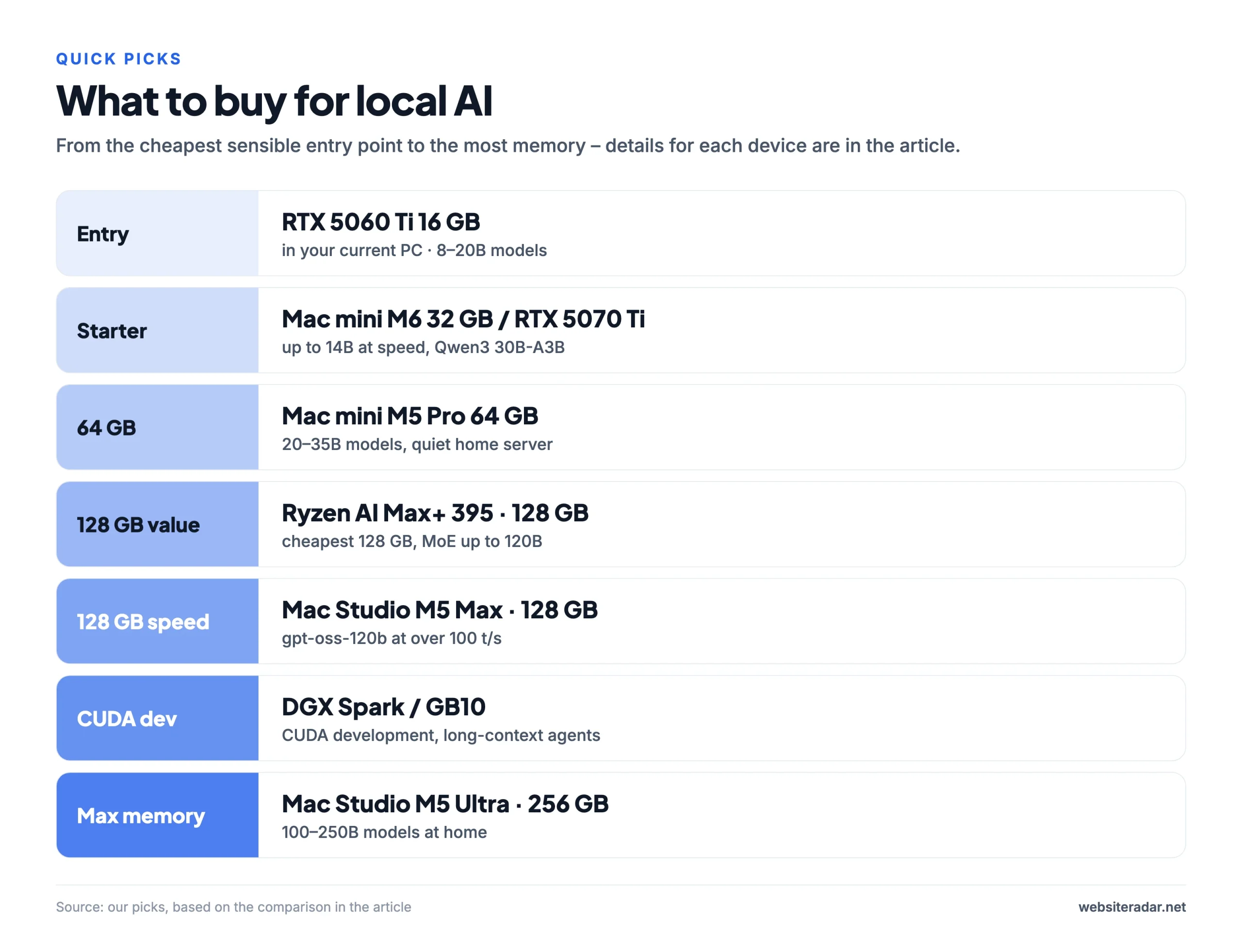
If you don’t want to read the whole guide, here is the shortcut. Every recommendation is covered in detail below, some with a video.
| Class | Pick | Models it handles |
|---|---|---|
| Entry | RTX 5060 Ti 16 GB in your current PC | 8–20B (Qwen3 14B, gpt-oss-20b) |
| Starter | Mac mini M6 with 32 GB or RTX 5070 Ti | up to 14B at speed, Qwen3 30B-A3B |
| 64 GB | Mac mini M5 Pro with 64 GB | 20–35B, a quiet home server |
| 128 GB, best value | Ryzen AI Max+ 395 with 128 GB | large MoE models up to 120B |
| 128 GB, fastest output | Mac Studio M5 Max with 128 GB | gpt-oss-120b at over 100 tokens/s |
| CUDA developer box | DGX Spark or another GB10 machine | CUDA development, coding agents |
| Maximum memory | Mac Studio M5 Ultra with 256 GB | 100–250B models at home |
| Team workstation | RTX PRO 6000 | 70–120B for a whole team |
Why run AI locally – and what not to expect
A local model runs on your own computer. Your data never leaves the desk, you pay no monthly subscription or per-token fees, the model works offline, and nobody can change or retire it overnight. That makes it a good fit for sensitive documents, coding assistants working on company code, automations that send thousands of requests a day – or simply for the fun of experimenting.
There are two catches. First, the open models that fit on home hardware are smart, but not at the level of the best cloud services. Second, the hardware is not cheap, and in 2026 memory shortages have been pushing prices up. The main reasons to go local are privacy, control and independence – not saving money.
How a model runs on your computer
When you send a model a question, two phases happen, and each one is limited by something different:
- Reading the prompt (prefill). The model processes your entire input at once – the question, a pasted document, your project’s code. This phase depends on the GPU’s compute power, and it determines how long you wait for the first word of the answer. For a short question it takes a fraction of a second; for a document tens of thousands of words long it can take minutes.
- Writing the answer (decode). The model generates text one word at a time (strictly speaking, one token at a time). For every token it has to read the whole model from memory – or, for mixture-of-experts models, just the active part. This phase depends on memory bandwidth: how many gigabytes per second the chip can read.

The practical difference: for chat, fast output is what you feel (and the Mac shines here). For coding agents and document work, which keep sending the model huge amounts of context, fast prompt reading matters just as much (and NVIDIA leads there). Speed is measured in tokens per second – one token is roughly three quarters of a word. Around 15 tokens per second matches reading speed; above 50 the model feels snappy.
How much memory you need
The whole model has to sit in fast memory that the GPU can access: either the graphics card’s VRAM, or the shared (unified) memory found in Macs, the DGX Spark or the Ryzen AI Max. If it doesn’t fit, part of it spills into regular system RAM and speed collapses. In one test on an RTX 5060 Ti, moving just a sixth of the layers of Qwen 14B off the GPU cut output speed from 43 to 12.5 tokens per second; on the CPU alone it managed 2.9.

| Model | Type | Size (4-bit) | Where it fits |
|---|---|---|---|
| Llama 3.1 8B / Qwen3 8B | dense | 4.9–5.0 GB | anything with 8 GB |
| Qwen3 14B | dense | 9.0 GB | 12–16 GB |
| gpt-oss-20b | MoE | 12.1 GB (MXFP4) | 16 GB |
| Gemma 3 27B | dense | 16.6 GB | 24 GB |
| Qwen3 30B-A3B | MoE, 3B active | 18.6 GB | 24 GB |
| Qwen3 32B | dense | 19.8 GB | 24–32 GB |
| Llama 3.3 70B | dense | 42.5 GB | 48 GB or more |
| gpt-oss-120b | MoE | 63.4 GB (MXFP4) | 96–128 GB |
| GLM-4.5-Air 106B | MoE | 73.0 GB | 96 GB or more |
| Qwen3.5 122B-A10B | MoE | 76.5 GB | 96–128 GB |
| Qwen3 235B-A22B | MoE | 142.2 GB | 192–256 GB |
| DeepSeek R1 671B | MoE | 404.9 GB | 512 GB |
Context needs memory too
On top of the model itself you need memory for the context (the KV cache) – everything the model “remembers” from the conversation or document. For Llama 3.3 70B that is about 10 GB extra at a 32,000-token context and around 40 GB at 128,000 tokens. The gpt-oss models are far more frugal thanks to a sliding window: gpt-oss-120b needs at most about 9 GB even for 128,000 tokens. Output speed also drops as the context grows – gpt-oss-120b on an M5 Max writes about 80 tokens per second with a short context, but only 14 at 128,000 tokens.
Not all memory goes to the GPU
- macOS lets the GPU use roughly 75% of RAM by default (Apple doesn’t publish the exact figure). A 64 GB Mac therefore offers about 48 GB for the model, a 128 GB Mac about 96 GB. You can raise the limit with
sudo sysctl iogpu.wired_limit_mb=…, but it resets after a reboot. - Windows on Ryzen AI Max splits memory in the BIOS at a fixed ratio – the GPU gets at most 96 GB out of 128 GB. On Linux it can go up to about 124 GB.
- NVIDIA RTX Spark laptops default to roughly a 50:50 split on Windows, with at most 96 GB of 128 GB set manually. The 32 GB version gives the GPU only 16 GB.
- DGX Spark on Linux allocates memory dynamically, so the model can use most of the 128 GB.
Quantization and MoE, simply explained
Quantization is compression for models: instead of 16 bits per parameter you use 8 or 4. At 4 bits (labelled Q4, Q4_K_M or MXFP4) a model takes up about a quarter of its original size and quality drops only slightly – a sensible default for home use. Eight bits (Q8) is nearly lossless but twice as large.
Mixture of experts (MoE) is an architecture where the model has a lot of parameters but only uses a small slice of them for each word. gpt-oss-120b has 117 billion parameters but activates only about five billion per step; Qwen3 30B-A3B just three billion. Such a model needs a lot of memory but writes at the speed of a much smaller one. That makes MoE models ideal for machines with large but slower shared memory – DGX Spark, Ryzen AI Max or Macs. Dense models (Llama 70B, Qwen3 32B), on the other hand, read the entire model for every word and crawl on slow memory.
Memory bandwidth: why a Mac writes faster than a Spark
You can estimate output speed quite well: memory bandwidth divided by how much data the model has to read per token. A dense 70B model at 4 bits (~42 GB) therefore can’t write faster than about 6–7 tokens per second on a DGX Spark with 273 GB/s – and measurements show around 4.4.


The map makes it clear that there is no perfect device. NVIDIA graphics cards have the fastest memory but little capacity. DGX Spark, Ryzen AI Max and RTX Spark have plenty of capacity but slower memory. The Mac Studio with M5 Max – and above all M5 Ultra – combines both, at the cost of no CUDA and slower prompt reading than NVIDIA.
Same model, different hardware
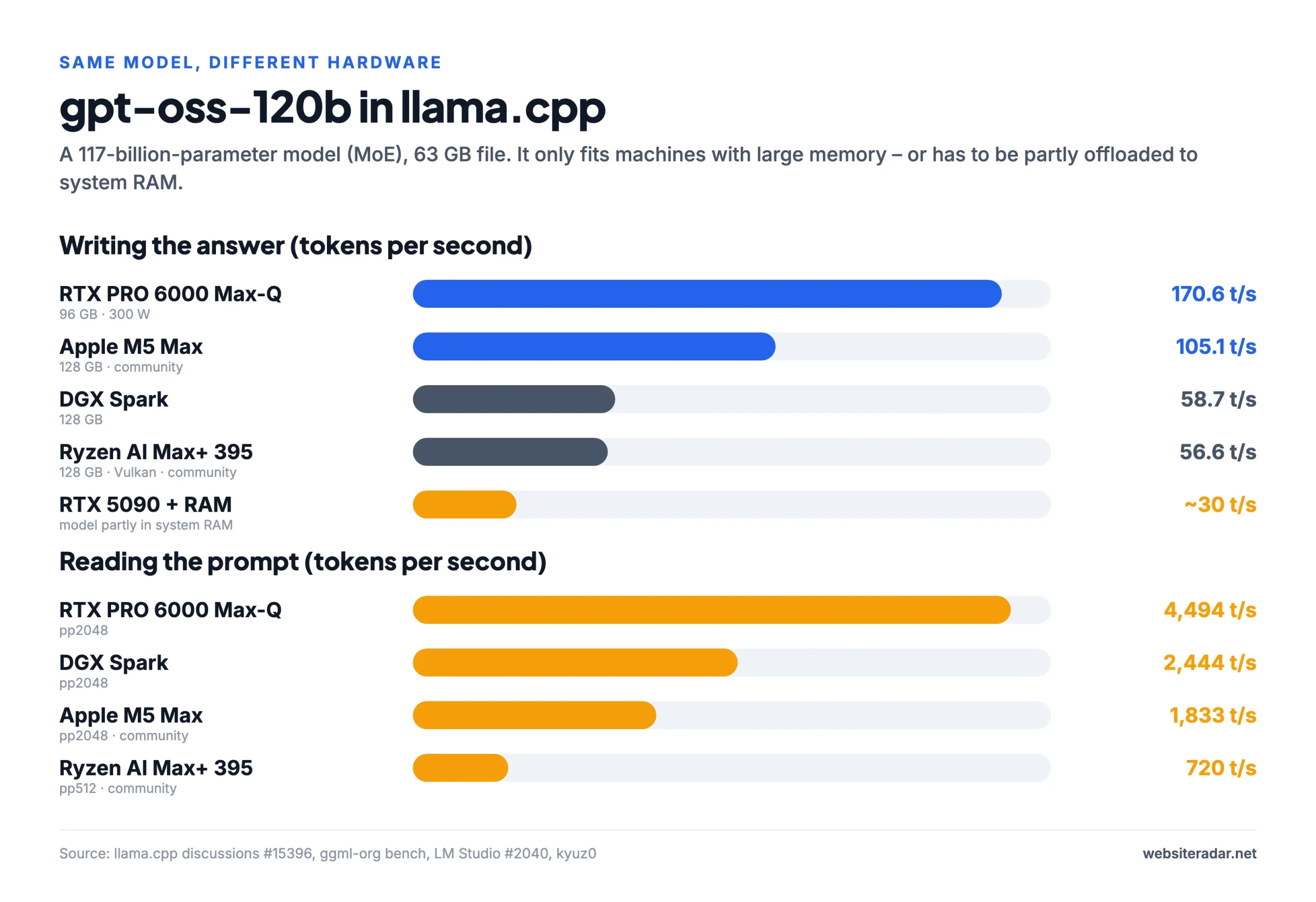
The fairest comparison uses the same model in the same program. We picked OpenAI’s gpt-oss-120b (63 GB) and measurements from llama.cpp, the most widely used program for running local models.
All devices compared
| Device | Memory for AI | Bandwidth | gpt-oss-120b, output |
|---|---|---|---|
| Mac Studio M5 Max | ~96 GB of 128 GB | 614 GB/s | 105 t/s¹ |
| NVIDIA DGX Spark | 128 GB | 273 GB/s | 58.7 t/s |
| RTX Spark laptops | up to 96 GB of 128 GB | up to 300 GB/s | – |
| Ryzen AI Max+ 395 | 96 GB (Windows) / ~124 GB (Linux) | 256 GB/s | 56.6 t/s |
| Mac Studio M5 Ultra | ~192 GB of 256 GB | 1,228 GB/s | – |
| Mac mini M5 Pro | ~48 GB of 64 GB | 307 GB/s | doesn’t fit |
| Mac mini M6 | ~24 GB of 32 GB | 170 GB/s | doesn’t fit |
| MacBook Pro M5 Max | ~96 GB of 128 GB | 614 GB/s | 105 t/s¹ |
| RTX 5090 | 32 GB | 1,792 GB/s | ~30 t/s² |
| RTX 5060 Ti 16 GB | 16 GB | 448 GB/s | doesn’t fit |
| RTX 5070 Ti / 5080 | 16 GB | 896 / 960 GB/s | doesn’t fit |
| RTX PRO 6000 Max-Q | 96 GB | 1,792 GB/s | 170.6 t/s |
| GB10 from ASUS, MSI, Lenovo… | 128 GB | 273 GB/s | ~ same as Spark |
| Radeon AI PRO R9700 | 32 GB | ~640 GB/s | doesn’t fit |
| Copilot+ laptops | ~8 GB of 16 GB | ~135 GB/s | doesn’t fit |
¹ Community measurement on a MacBook Pro M5 Max with 128 GB, llama.cpp. ² Part of the model offloaded to system RAM.
1. Mac Studio M5 Max – the fastest output for the money
The Mac Studio with the M5 Max chip is today’s most sensible choice for anyone who wants the fastest possible local chat or agent and doesn’t need CUDA. With 614 GB/s of memory bandwidth, the 128 GB version runs gpt-oss-120b at over 100 tokens per second – almost twice as fast as a DGX Spark. The new neural accelerators in every GPU core also sped up prompt reading, but only in up-to-date software (see software setup).
- Memory: 36, 48, 64 or 128 GB · bandwidth 460 GB/s (36 GB) / 614 GB/s
- Power: 7 W idle, 200 W max
- Ports: 4× Thunderbolt 5, 10GbE
- Watch out: the 36 GB version has a weaker 32-core GPU and leaves only about 27 GB for the model. From 48 GB up you get the full chip.
- US list price: from $2,499 (base configuration, August 2026)
Good for: chat and agents with MoE models, a quiet home AI server, people who also edit video. Not for: anyone who needs CUDA, vLLM or training.
2. NVIDIA DGX Spark – a developer workstation, not a chat box
The GB10 chip with 128 GB of shared memory and NVIDIA’s full software stack (CUDA, vLLM, TensorRT-LLM) in a box 15 × 15 cm. It reads prompts faster than any other small machine – 2,444 tokens per second on gpt-oss-120b – but with 273 GB/s of bandwidth it writes more slowly than a Mac: 58.7 tokens per second, and only 4.4 on dense Llama 70B. It draws 60–90 W while running a model, and two units can be linked with a QSFP cable for models of up to around 400 billion parameters.
- Memory: 128 GB LPDDR5x · bandwidth 273 GB/s
- GPU: Blackwell, 6,144 CUDA cores · AI performance 1 PFLOP FP4 (with sparsity; roughly half in practice)
- OS: DGX OS (Ubuntu on Arm)
- US list price: $3,999 at launch (October 2025), $4,699 from February 2026; ServeTheHome reported a move to a “$6,950-ish” tier in October 2026
Good for: CUDA development, coding agents with large contexts, fine-tuning up to 70B. Not for: fast chat with dense 70B models, Windows and gaming, beginners.
3. NVIDIA RTX Spark laptops – 128 GB in a backpack
The N1X chip is a GB10 adapted for Windows laptops, with faster memory (up to 300 GB/s) and a 45–80 W power envelope. In The Register’s test, a laptop ran Qwen3.6 35B-A3B at 67.6 tokens per second – faster than the desktop DGX Spark. The catch is Windows: the GPU only gets a fixed part of the memory – at most 16 GB out of 32 GB, 48 GB out of 64 GB, and 96 GB out of 128 GB.
- Memory: 32, 64 or 128 GB · bandwidth up to 300 GB/s
- GPU: Blackwell, 6,144 cores (roughly a laptop RTX 5070 in performance)
- OS: Windows 11 on Arm, CUDA from version 13.4
- Watch out: the first units (Surface, HP) crashed in reviews after hours of full load; Linux is not officially supported
- US price: from $2,599 (Surface Laptop Ultra with 24 GB) to $5,899.99 (Surface with 128 GB), October 2026
Good for: large models on a Windows laptop, coding agents, creative work. Not for: the 32 GB version, long training runs, x86-only software.
4. Ryzen AI Max+ 395 – the cheapest 128 GB
Mini PCs with the 16-core Ryzen and Radeon 8060S graphics share 128 GB of memory. Output speed is comparable to the DGX Spark (gpt-oss-120b at 56.6 tokens per second) for roughly half the price, and they run Windows and Linux – and games. The weak spot is prompt reading: it is two to three times slower than on the Spark and drops with long contexts – to 146 tokens per second with the Vulkan driver, 371 with ROCm.
- Memory: 128 GB LPDDR5x · bandwidth 256 GB/s (~215 measured)
- For the GPU: 96 GB on Windows, ~124 GB on Linux
- Software: Vulkan or ROCm (gfx1151 has been officially supported since 2026)
- HP Z2 Mini G1a costs more, but it is a certified workstation with ECC memory and a three-year warranty
- US price example: Framework Desktop with 128 GB launched at $1,999 and costs $2,459 after the 2026 memory price increase
Good for: the most memory for the money, large MoE models, chat and summaries. Not for: agents with huge contexts, CUDA, or the ROG Flow Z13 tablet with 32–64 GB for large models.
5. Mac Studio M5 Ultra – the memory king
Up to 512 GB of memory and 1.2 TB/s of bandwidth. In the MacStories review, the M5 Ultra read prompts four times faster than the previous M3 Ultra and wrote 50% faster. The 256 GB version even fits Qwen3 235B. Several units can be linked via Thunderbolt 5 and RDMA: according to Apple, four M5 Ultras run an 816-billion-parameter model at 36.7 tokens per second.
- Memory: 96, 256 or 512 GB (512 GB arrives at the end of October) · bandwidth 1,228 GB/s
- Power: 9 W idle, around 300 W while running a model
- Ports: 6× Thunderbolt 5
- Watch out: memory can’t be upgraded later; in September the wait time was up to 18 weeks
- US list price: from $5,499 (August 2026); going from 96 to 256 GB adds $4,000
Good for: 100–250B models, agents with long contexts, small teams. Not for: models up to 30B, CUDA, tight budgets.
6. Mac mini M5 Pro – the sensible entry point
The cheapest Mac that runs genuinely useful models. 307 GB/s of bandwidth, up to 64 GB of memory and Thunderbolt 5. Thanks to the neural accelerators it reads prompts about three times faster than the previous M4 Pro. The 64 GB version comfortably runs models up to 32 billion parameters; dense Llama 70B fits but only manages about 7 tokens per second, and gpt-oss-120b doesn’t fit.
- Memory: 24, 48 or 64 GB · bandwidth 307 GB/s
- Power: 6 W idle, 145 W max · virtually silent at idle
- US list price: from $1,699 (base configuration, August 2026)
Good for: 20–35B models, a quiet home AI server. Not for: gpt-oss-120b, dense 70B, the 24 GB version.
7. Mac mini M6 – cheap, but not with 16 GB
The cheapest Mac with neural accelerators. It tops out at 32 GB and 170 GB/s – the 16 GB version has only 153 GB/s and leaves about 12 GB for the model. Compared with the previous Mac mini with M4, it reads prompts 4.5× faster and writes 50% faster at practically the same price, so don’t buy the old model even on sale.
- Memory: 16, 24 or 32 GB (maximum) · bandwidth 153 / 170 GB/s
- Power: 4 W idle, 70 W max
- Watch out: Thunderbolt 4 only, so no linking of multiple units
- US list price: from $899 (base configuration, August 2026)
Good for: 7–14B models, gpt-oss-20b, Qwen3 30B-A3B. Not for: the 16 GB version, models of 70B and up.
8. MacBook Pro M5 Max – AI on the go
The same chip as the Mac Studio, and therefore the same speed: the fastest laptop for local models. With the mid-sized Qwen3.6 35B-A3B it generates over 90 tokens per second. The 14-inch version, however, throttles under sustained load (from 96 to 42 W), and charging is capped at 97 W. A Mac Studio with the same chip and 128 GB is considerably cheaper.
- Memory: 36, 48, 64 or 128 GB · bandwidth 460 / 614 GB/s
- Battery: 72.4 Wh (14″) / 100 Wh (16″)
- US list price: from $3,599 (14″) and $3,899 (16″), March 2026; going from 64 to 128 GB adds $1,000
Good for: people who need large models on the road, ideally the 16-inch with 64–128 GB. Not for: the 36 GB version, round-the-clock workloads, anyone who works at a desk.
9. RTX 5090 – the fastest, but only 32 GB
1,792 GB/s of bandwidth: gpt-oss-20b writes at almost 300 tokens per second, and the card reads a long prompt about twice as fast as a Mac Studio with M5 Ultra. 32 GB holds models of up to about 32 billion parameters at 4 bits, even with a long context; a 70-billion-parameter model doesn’t fit. Large MoE models can be partly offloaded to system RAM – gpt-oss-120b then runs at about 30 tokens per second.
- Memory: 32 GB GDDR7 · bandwidth 1,792 GB/s
- Power: 575 W, 1,000 W power supply recommended
- US list price: $1,999 at launch (January 2025); street prices in 2026 are far higher because of the memory shortage
Good for: coding agents and RAG with models up to 32B, CUDA development, gaming. Not for: 70B models and larger, a quiet low-power server.
10. RTX 5060 Ti 16 GB – the cheapest sensible entry point
The cheapest new 16 GB graphics card. It runs gpt-oss-20b at about 92 tokens per second, Qwen3 8B at 69 and Qwen3 14B at 41 – faster than you can read. Its memory bandwidth is half that of the RTX 5070 Ti, though, so it writes at roughly half the pace, and models around 30 billion parameters don’t fit into 16 GB.
- Memory: 16 GB GDDR7 · bandwidth 448 GB/s
- Power: 180 W, a 600 W power supply is enough
- US list price: $429 for the 16 GB version at launch (April 2025)
Good for: first serious experiments, 8–20B models, a budget AI PC. Not for: models of 27B and up.
11. RTX 5070 Ti vs RTX 5080 – nearly identical for AI
Both cards have 16 GB and almost the same bandwidth (896 vs 960 GB/s), so they write at nearly the same speed: 182.4 vs 184.7 tokens per second in the standard llama.cpp test, and 74 vs 81 on Qwen3 14B. Exactly the same models fit into both. The 5080 is faster mainly in games – and its launch price was $250 higher ($999 vs $749).
Our advice: for AI, get the RTX 5070 Ti and put the money you save into a bigger SSD or more RAM. Only buy the RTX 5080 if gaming is the main use.
12. RTX PRO 6000 – 96 GB on a single card
The only card that fits all of Llama 3.3 70B (32 tokens per second), gpt-oss-120b (170.6 tokens per second in the Max-Q version) and Qwen3.5 122B (about 98 tokens per second). Thanks to CUDA and vLLM it can serve several users at once. You can buy it as a standalone card or inside a pre-built workstation.
- Memory: 96 GB GDDR7 with ECC · bandwidth 1,792 GB/s
- Power: 300 W (Max-Q); the full 600 W version writes about 13% faster
- US list price: $8,565 at launch; NVIDIA later raised it to $13,250
Good for: companies and teams that want to run large models in-house or train them. Not for: individuals and hobbyists.
13. DGX Spark from ASUS, MSI, Lenovo, Dell and Gigabyte – which one to pick
Five other manufacturers sell the same GB10 chip as the DGX Spark. AI performance differs by only a few percent; the differences are in storage, power supply, cooling and support – and in price.
| Model | Storage | Power supply | Stand-out feature |
|---|---|---|---|
| NVIDIA / PNY DGX Spark | 4 TB, self-encrypting | 240 W | the original |
| GIGABYTE AI TOP ATOM | 4 TB PCIe 5.0 | 240 W | fastest SSD |
| ASUS Ascent GX10 | 1 TB PCIe 4.0 / 4 TB PCIe 5.0 | 240 W | front power button |
| Lenovo ThinkStation PGX | 1 / 2 / 4 TB, self-encrypting | 240 W | one year of on-site service |
| Dell Pro Max with GB10 | PCIe 4.0 (2 TB is QLC) | 280 W | stronger PSU, hottest SSD |
| MSI EdgeXpert | 4 TB | – | new, no independent tests yet |
Our advice: the best kit for sensible money is the Gigabyte AI TOP ATOM with 4 TB of fast storage; the cheapest proven starting point is the ASUS Ascent GX10 with 1 TB, which launched at about $3,000 in the US. If you plan to link two units, you’ll need a QSFP cable. New since 23 October 2026: a 64 GB version of the GB10 sold only by the partner brands, from $4,999.
14. Radeon AI PRO R9700 – 32 GB for a fraction of an RTX 5090
The cheapest new card with 32 GB. In the same Vulkan test it writes about 40% more slowly than the RTX 5090, but it fits the same models – around 30 billion parameters, even with a longer context. gpt-oss-20b and Qwen3 30B-A3B run on it at over 150 tokens per second. Beware of the marketing: “up to five times faster than the RTX 5080” only applies to a model that doesn’t fit into 16 GB.
- Memory: 32 GB GDDR6 · bandwidth ~640 GB/s · power 300 W
- Software: Vulkan (usually faster output) or ROCm (faster prompt reading); no CUDA
- US list price: $1,299 (October 2025)
Good for: 27–32B models with long contexts, several cards in one PC. Not for: CUDA-only tools, maximum speed.
15. “AI PCs” and Copilot+ laptops – a myth
Copilot+ is Microsoft’s certification for Windows features – camera effects, live captions, Recall or the small built-in Phi Silica model. It says nothing about the ability to run large language models. Neither Ollama nor LM Studio uses the neural processing unit (NPU), and llama.cpp only experimentally; the NPU is used only by vendor tools such as Microsoft Foundry Local or AMD Lemonade with selected models.
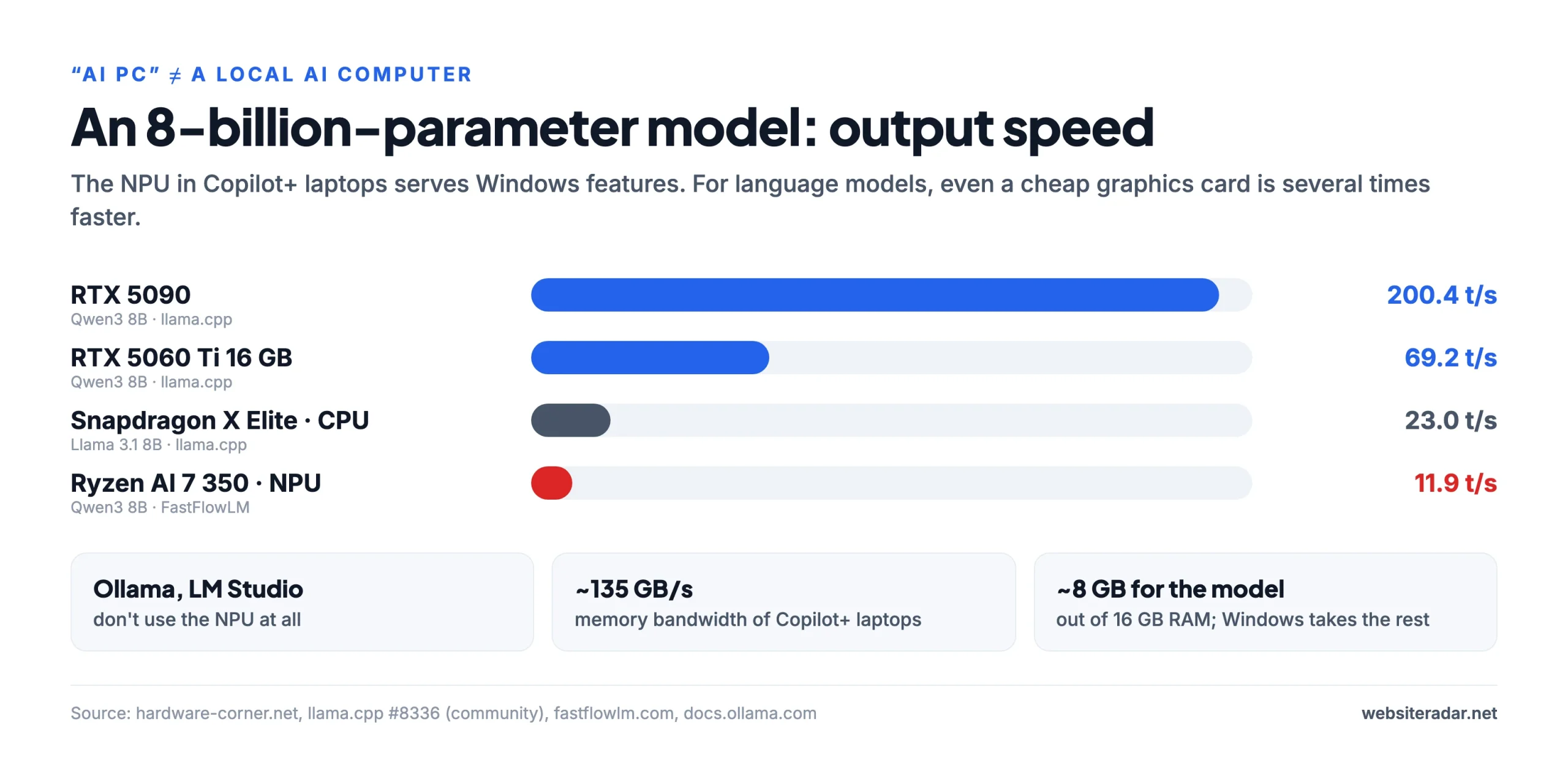
On top of that, these laptops have memory with around 135 GB/s of bandwidth and 16 GB of RAM, which leaves about 8 GB for the model. They’re fine for models up to 4 billion parameters and Windows features – not for “your own ChatGPT at home”.
Good for: office work, battery life, small 1–4B models. Not for: anyone who wants to run 14B models or larger.
Power and running costs
If the computer is going to run as a home AI server around the clock, power draw and noise matter too.
| Device | Idle | Running a model / maximum | Note |
|---|---|---|---|
| Mac mini M6 | 4 W | 70 W max | virtually silent |
| Mac mini M5 Pro | 6 W | 145 W max | 5 dBA at idle (Apple) |
| Mac Studio M5 Max | 7 W | 200 W max | quiet |
| Mac Studio M5 Ultra | 9 W | ~300 W running AI | quiet, according to reviews |
| DGX Spark | 25–45 W | 60–90 W running AI, peaks up to 200 W | depends on firmware version |
| Ryzen AI Max+ 395 mini PC | ~13 W | 120–160 W | HP Z2 Mini is loud under load |
| RTX 5090 (card only) | – | up to 575 W | plus the rest of the PC |
| RTX 5060 Ti (card only) | – | up to 180 W |
The figures come from manufacturers and reviews (ServeTheHome, Tom’s Hardware, Notebookcheck) and were not measured with the same method – treat them as a guide.
Software: what to run the model with
- Ollama – the easiest start on every platform; you download a model with one command. On the Mac, from version 0.19 (still in preview, for selected models) it uses MLX and the M5 neural accelerators.
- LM Studio – a clear app with a graphical interface. Tip for M5 Macs: with GGUF models it doesn’t use the neural accelerators yet and reads prompts at about half the speed; use models in MLX format instead.
- llama.cpp – the foundation of most other tools, with the most settings and the fastest support for new hardware. On Ryzen AI Max, try both backends: Vulkan usually writes faster, ROCm reads long prompts faster.
- MLX – Apple’s library, with the best performance on the Mac, including linking several Macs over Thunderbolt 5.
- vLLM, SGLang, TensorRT-LLM – server tools for NVIDIA when one model serves several users at once.
The most common buying mistakes
- A 36 GB Mac “for AI”. It has a weaker chip and leaves only about 27 GB for the model.
- An RTX Spark laptop with 32 GB. Windows gives the GPU 16 GB at most.
- A Mac mini M6 with 16 GB. Slower memory and only about 12 GB for the model.
- A Copilot+ laptop for local AI. Everyday tools don’t use the NPU.
- An RTX 5080 instead of a 5070 Ti just for AI. The same 16 GB, almost the same speed.
- Ignoring memory bandwidth. Large but slow memory means slow output with dense models.
- Skimping on memory. On Macs, Ryzen AI Max and RTX Spark the memory is soldered, and you can’t add more later.
Frequently asked questions
Is 16 GB enough for local AI? For models up to 14–20 billion parameters, yes – gpt-oss-20b or Qwen3 14B, for example. Models around 30 billion need 24–32 GB, and 70 billion needs at least 48 GB.
Mac or NVIDIA? A Mac writes faster and gives you more memory for the money; NVIDIA reads prompts faster and has CUDA. For chat and agents with MoE models the Mac comes out ahead; for development, training and serving several users, NVIDIA does.
What does “MoE” mean? Mixture of experts: the model has many parameters but uses only a small part of them for each word. It needs a lot of memory but writes at the speed of a smaller model.
How fast does a model need to write? About 15 tokens per second matches reading speed. For smooth chat, 30 or more feels comfortable; for coding agents that generate a lot of text, 50 or more is better.
Is local AI cheaper than a subscription? Usually not – models comparable to the best cloud services need machines costing many thousands of dollars. The main reasons are privacy, control over your data and independence.
Can I link several computers? Yes. Two DGX Sparks connect with a QSFP cable, Macs with Thunderbolt 5 over RDMA (using MLX or exo). The Mac mini M6 can’t do this because it only has Thunderbolt 4.
How we compared, and sources
We did not test the devices ourselves. The numbers come from verified sources, and we always cite them in the charts. We compare speed in a single program (llama.cpp), because a different program or quantization can easily shift the results by 20–50%. Community measurements (GitHub, forums) are marked. Prices are US list prices taken from manufacturer announcements and reviews, with their date.
- Model spilling into RAM, RTX 5060 Ti: inventivehq.com/blog/vram-offload-cliff-gpu-layers-benchmark
- DGX Spark benchmark: github.com/ggml-org/llama.cpp/blob/master/benches/dgx-spark/dgx-spark.md
- gpt-oss guide and GPU measurements: github.com/ggml-org/llama.cpp/discussions/15396
- M5 Max and LM Studio: github.com/lmstudio-ai/lmstudio-bug-tracker/issues/2040
- Ryzen AI Max (Strix Halo): strix-halo-toolboxes.com, llm-tracker.info/_TOORG/Strix-Halo
- Apple: apple.com/mac-studio/specs, apple.com/mac-mini/specs, machinelearning.apple.com/research/mlx-distributed-inference
- M5 Ultra: macstories.net/stories/m5-ultra-mac-studio-review-the-dream-mac-for-local-ai-agents
- RTX Spark: theregister.com (16 Oct 2026), servethehome.com, storagereview.com
- GeForce graphics cards: nvidia.com/en-us/geforce/graphics-cards/compare, hardware-corner.net/gpu-llm-benchmarks
- llama.cpp leaderboards: github.com/ggml-org/llama.cpp/discussions/15013 and /10879
- Copilot+ PC: microsoft.com/windows/windows-11-specifications, docs.ollama.com/gpu, fastflowlm.com
- Model sizes: huggingface.co (ggml-org, unsloth and bartowski repositories)
- Prices: Apple Newsroom, NVIDIA Newsroom and developer forums, servethehome.com, storagereview.com, notebookcheck.net, tomshardware.com