
Our website contains links to partner sites. If you click from our site to the partner's site and purchase their services there, we will receive a commission for mediation (Find out more information). This form of cooperation does not affect the objectivity of our reviews. With each purchase made through links from our site, you support our editorial office so that we can create quality and useful content in the future. Thank you.

Honest and deep benchmark of VPS hosting – exceptional performance and speed provided by Coolhousing

Every time I test a VPS, I follow the same straightforward process: I ignore catalog specs and marketing claims, simply order the server, set it up for my workflow, and launch actual projects. Throughout regular use, I closely observe its performance, track how it handles increased activity, and identify its boundaries. This review is based on several days spent testing Linux VPS START from Coolhousing, during which I ran both WordPress and WooCommerce and performed numerous benchmarks.
📣 What You’ll Learn in This Review
- The real-world performance VPS START delivers when running WordPress and WooCommerce
- The infrastructure and facilities of the Coolhousing data center
- How installation and management work through the Control Panel and SSH
- What security and additional services are included
- Whether VPS START passed both synthetic and practical performance tests
About Coolhousing
Coolhousing s.r.o. has operated a professional data center with three server rooms since 2003. The company specializes in colocation for both rack and tower servers, dedicated server hosting, and virtual private servers for Linux and Windows. Their proprietary telehouse in Prague, Czech Republic runs modern technology with emphasis on maximum security, availability, transparency, and personalized service.
The data center meets high standards and holds ISO 9001 and 27001 certifications for physical security, redundant power supply, connectivity, and cooling in at least N+1 configuration. Coolhousing also offers managed services and advanced networking solutions, high reliability, and fast 24/7 technical support. Thanks to their own equipment, Coolhousing isn’t dependent on third parties, which shows in both availability and performance scalability.
Control Panel and VPS Installation
Comprehensive administration
Coolhousing has developed its own administration panel. Although the design is not the most contemporary, it remains intuitive, responsive, and provides all essential functions required for effective VPS management—including system reinstallation, snapshot management, monitoring, and network configuration. The initial operating system installation is performed via a noVNC console within the browser; however, subsequent routine operations are typically conducted through SSH in the terminal. This overview does not elaborate on specific features, as Coolhousing has comprehensively documented them in their web administration article.
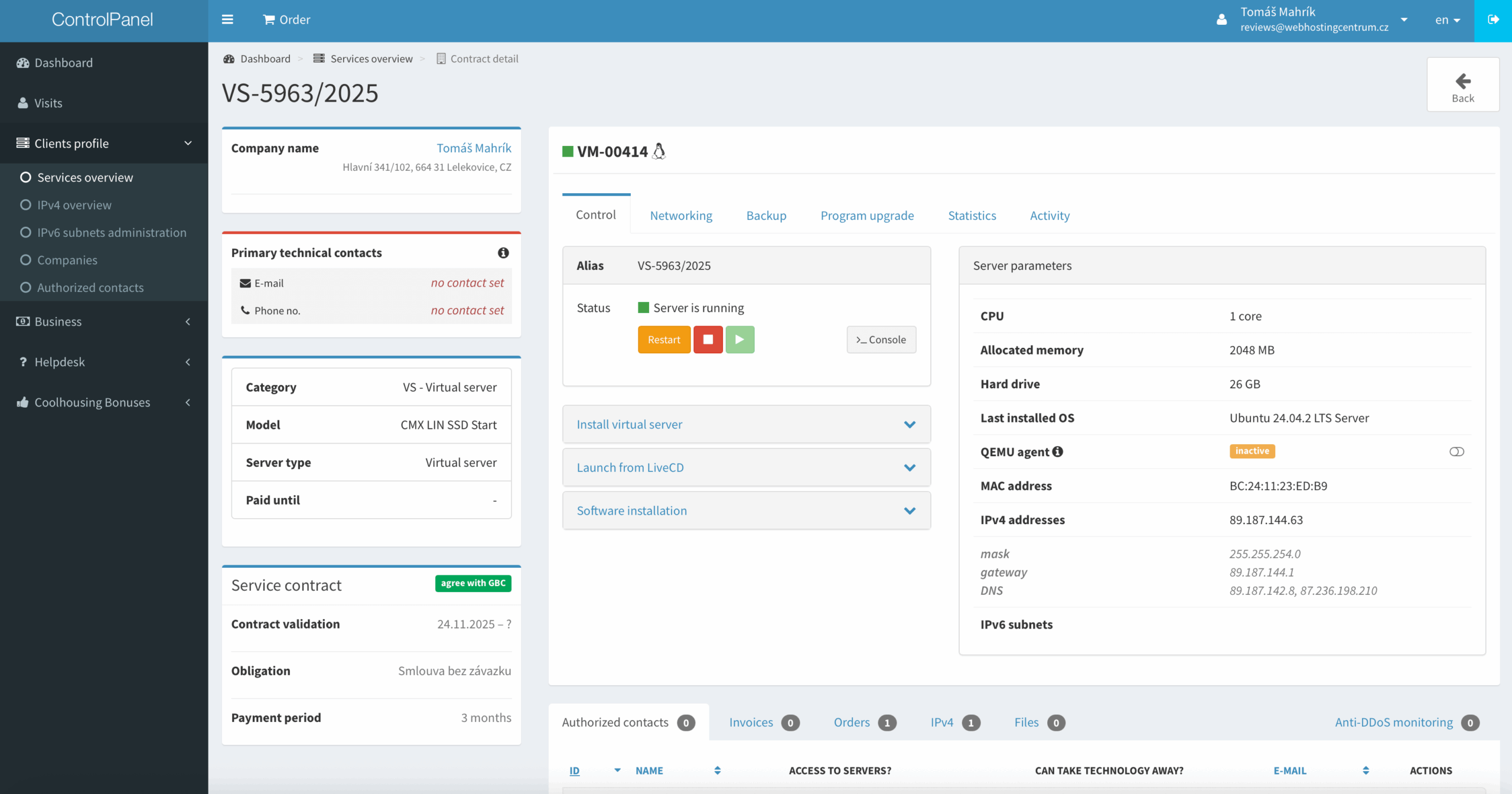
Why Coolhousing Chose Modern Virtualization Proxmox VE
Most VPS providers rely on KVM virtualization, known for its reliability and versatility. In contrast, Coolhousing’s new generation of VPS uses the Proxmox VE platform, which enhances KVM by offering improved storage management, faster snapshots, easier administration, and steadier performance under heavy loads. When paired with AMD EPYC processors and NVMe storage, this creates a modern, highly optimized setup that provides superior I/O performance, reduced latency, and greater dependability compared to standard KVM-only solutions.
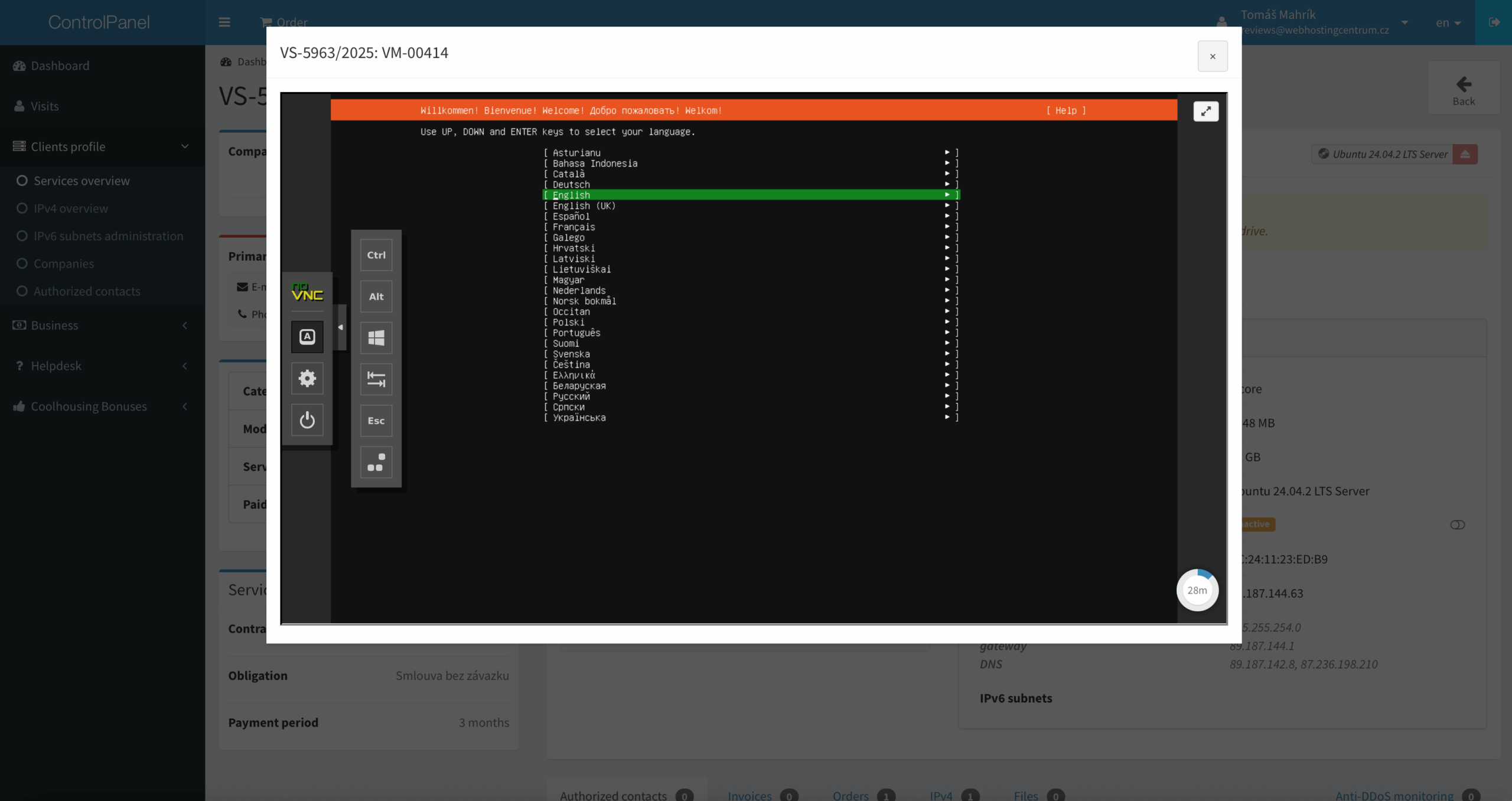
Operating System Installation
I chose Ubuntu as my OS. The installation completed within a few minutes. Then I logged in via SSH and ran my usual configuration script, which automatically installed:
- Apache
- MariaDB
- PHP 8.4
- Redis
- Adminer
- Let’s Encrypt SSL
- Testing utilities
The script also created a virtual host for my test domain and deployed a clean WordPress installation. Within minutes, everything was ready for performance testing.
Coolhousing VPS Package Comparison
Coolhousing provides three primary VPS variants for Linux. The table below outlines their key specifications and demonstrates how each package differs in terms of performance, memory, and available storage.
Linux VPS Technical Specifications
| Plan | CPU | RAM | Disk | Connectivity |
|---|---|---|---|---|
| VPS START | 1× AMD EPYC vCPU | 2 GB | 25 GB NVMe SSD | 100 Mbps (shared, unlimited data transfer) |
| VPS STANDARD | 2× AMD EPYC vCPU | 4 GB | 50 GB NVMe SSD | 1 Gbps (unlimited data transfer) |
| VPS BUSINESS | 4× AMD EPYC vCPU | 8 GB | 80 GB NVMe SSD | 1 Gbps (unlimited data transfer) |
All Linux VPS instances run on the Proxmox VE virtualization platform (KVM virtualization) using modern AMD EPYC processors. Storage utilizes NVMe SSDs, which offer up to three times the disk performance (IOPS) compared to traditional SSDs. Each VPS includes 1× IPv4 address and an IPv6 /64 block, with unlimited data transfer. A wide selection of operating systems is supported – beyond common Linux distributions, FreeBSD can also be installed. If needed, you can upgrade to a higher tier anytime without system reinstallation.
Coolhousing also offers Windows Server VPS running on the same infrastructure (Proxmox VE, AMD EPYC, NVMe). This review doesn’t cover Windows variants – I’m focusing purely on Linux. If you’re interested in the Windows VPS offering, you can find it on the VPS pricing page.
For more demanding projects requiring even greater performance, Coolhousing also offers VDS (Virtual Dedicated Server). VDS provides up to 16 CPU cores, 32 GB RAM, and disk space up to 1 TB, ensuring consistent performance and capacity under high load – an ideal choice for production databases, larger e-commerce stores, or applications with unpredictable traffic.
Additional Services
Backups and Snapshots
A manual snapshot included in the price, plus the option to choose backup plans up to 30 days, is a significant advantage. Recovery is a single click away, which is useful during updates, testing, or configuration errors. For demanding users requiring maximum availability, Coolhousing can set up SLAs, geographic backups, or failover VPS in various configurations.
Anti-DDoS Protection
Every VPS includes basic Anti-DDoS protection at the data center level. Thanks to multiple optical routes and robust backbone connectivity, the connection remains stable even under higher load.
Technical Support
Support operates 24/7 via phone and email. Responses during my testing were fast and substantive, which I particularly appreciate for technical questions about configuration.
Upgrade Without Configuration Changes
When upgrading virtual server configuration, Coolhousing performs the upgrade without requiring reinstallation or changes to network or application settings.
Managed VPS
For less technical users, Coolhousing offers a Managed VPS option for an additional fee. I personally prefer my own configuration, but the full management option is certainly valuable.
Coolhousing VPS Pricing
Coolhousing offers three VPS tiers. Pricing falls in the mid-range, with the cheapest VPS START variant suitable for testing, smaller WordPress sites, and lighter projects. Higher tiers target more demanding applications, e-commerce stores, or multi-hosting setups.
Below is an overview of current prices:
| Plan | Monthly Price (excl. VAT) |
|---|---|
| VPS START | €5.18 per month |
| VPS STANDARD | €10.35 per month |
| VPS BUSINESS | €15.53 per month |
All VPS offerings can be tried for 14 days with a full refund option.
VPS START Performance Tests – Linux from Coolhousing
To determine how the new Coolhousing VPS performs in practice, I conducted several synthetic and real-world tests. Testing occurred in two scenarios:
- WordPress (clean WP installation, no plugins, default Twenty Twenty-Five theme)
- WooCommerce (Kadence starter theme for WooCommerce, basic plugins, Redis + WP Fastest Cache, 1,000 products and 30 pages/posts)
| Plugin | Testing Purpose | Notes |
|---|---|---|
| Hosting Benchmark Tool | Synthetic performance tests (CPU, filesystem, database, WordPress, network) | Primary benchmarking tool |
| Speedtest Pro | Server benchmark: CPU/PHP, MySQL, Disk I/O | Excellent complement to Hosting Benchmark Tool |
| Query Monitor | Performance profiling: page generation time, SQL query count and speed | Best real-world WP performance test |
| WP Fastest Cache | Cache, optimization, performance testing with and without cache | Important for Apache/Nginx tests |
| RankMath | SEO plugin | Simulates commonly used plugin |
| Contact Form 7 | Typical business website test | Simulates commonly used plugin |
| WooCommerce | Small e-shop test | E-commerce performance test |
| FakerPress | Fake page and article generator for blog | |
| WP Dummy Content Generator | Fake product generator for WooCommerce |
| Parameter | Value |
|---|---|
| Server Architecture | Linux 6.8.0-88-generic x86_64 |
| Web Server | Apache |
| PHP Version | 8.4.15 (64bit) |
| PHP SAPI | fpm-fcgi |
| PHP max input variables | 5000 |
| PHP time limit | 300 s |
| PHP memory limit | 512 MB |
| Max input time | 300 s |
| Upload max filesize | 128 MB |
| PHP post max size | 128 MB |
| cURL Version | 8.5.0 (OpenSSL 3.0.13) |
| MariaDB Version | 10.11.14 |
| Permalink support (mod_rewrite) | Yes |
| Tool / Service | Test Type | What It Measures |
|---|---|---|
| Google PageSpeed Insights | Speed test | Performance score, FCP, LCP, CLS, TTFB |
| GTmetrix | Speed test | TTFB, Fully Loaded Time, Speed Index, Page Size, request count |
| UptimeRobot | Availability | Uptime %, outage count, total downtime |
| k6.io | Load test | Average response time, p95, maximum, RPS, error rate |
| Level | Installation Description | Purpose | Plugins / Tools Used |
|---|---|---|---|
| Level 1 – Clean WordPress | Default WP installation, Twenty Twenty-Five theme, no cache | Basic server performance test | Hosting Benchmark Tool, Speedtest Pro, Query Monitor, PageSpeed Insights, GTmetrix |
| Level 2 – WordPress with WooCommerce | WordPress + WooCommerce + demo products | E-commerce operation performance test | PageSpeed Insights, GTmetrix, UptimeRobot, k6.io, Query Monitor, WP Fastest Cache, Redis plugin |
This corresponds to two common use cases – a simple business website and a moderately demanding e-commerce store.
Below I’m starting with low-level VPS benchmarks (CPU, disk, RAM, network), because they reveal the “true” hardware and platform behavior. After that, I move to real-world WordPress and WooCommerce measurements, and I finish with concurrency/load behavior under k6.
Baseline VPS Benchmarks (CPU, RAM, Disk, Latency & Network)
Below are synthetic benchmark results focused directly on the VPS – CPU, memory, disk, I/O subsystem, latency, and network throughput. These tests are important for objectively assessing whether VPS hardware matches declared specifications and how it compares to typical VPS in this price category.
Network Throughput (Speedtest CLI)
Download: 118,41 Mbit/s
Upload: 120,84 Mbit/s
Ping: 18,4 ms
Measured Outcome
Network throughput aligns with what’s typical for entry-level European VPS plans. Upload and download speeds are well balanced and remain stable, with low latency to the test node.
RAM – Memory Test (sysbench)
- Write speed: 5553 MB/s
- Total operations: 10 485 760
- 95th percentile latency: 0,00 ms
Observed Behavior
The measured 5.5 GB/s memory throughput reflects fast DDR4-class performance with negligible latency. In practical terms, RAM bandwidth will not limit database or PHP workloads.
Internal Network – iperf3 (localhost → localhost)
- Average throughput: 40,3 Gbit/s
- Packet loss: 0 %
Performance Insight
Internal throughput reaches close to the theoretical limits of the virtualization platform. This is especially relevant for setups where PHP, databases, or containers communicate heavily over the local network.
Disk Latency – ioping
- Average latency: 316 μs
- IOPS: ~3160
What This Indicates
Average latency around 0.31 ms confirms NVMe storage running over an LVM layer. This level of responsiveness is typical for solid mid-tier NVMe setups and well suited for database-driven workloads.
Disk Throughput – fio (4× parallel random read)
- IOPS: 137 000
- Throughput: 533 MiB/s (559 MB/s)
- 99th percentile latency: 1,56 ms
Practical Impact
With 137K IOPS on 4K random reads, disk performance ranks among the stronger results in this VPS segment. This directly benefits database operations and CMS workloads such as WordPress.
Combined File Operations – sysbench fileio
- Reads/s: 3013
- Writes/s: 2008
- Fsyncs/s: 6431
- Total data: 2 GiB
Measured Outcome
The disk layer remains stable even during fsync-heavy operations. For WordPress and smaller databases, this translates into above-average I/O consistency under write pressure.
CPU Test (sysbench)
- CPU performance: 1359,97 events/s
- Average latency: 0,73 ms
Observed Behavior
The CPU score corresponds to a modern AMD EPYC core with strong single-thread performance. This is particularly important for PHP-based workloads like WordPress and WooCommerce.
Apache Benchmark (ab test)
- Requests per second: 7 554 req/s
- Average response time: 1,32 ms
- Median: 1 ms
- Max: 9 ms
Performance Insight
Handling over 7,500 static requests per second confirms that CPU, storage, and network resources are well balanced and tuned for high-throughput scenarios.
| Area | Rating |
|---|---|
| CPU Performance | Excellent (above-average single-core performance) |
| RAM Throughput | Very Good (5.5 GB/s) |
| Disk – IOPS | Excellent (137K IOPS random read) |
| Disk – Latency | Above Average (0.31 ms) |
| Apache Performance | Excellent (7,554 req/s) |
| Network – External | Standard VPS class |
| Network – Internal | Top-tier (40 Gbit/s loopback) |
Front-end Speed Snapshot (Google PageSpeed Insights & GTmetrix)
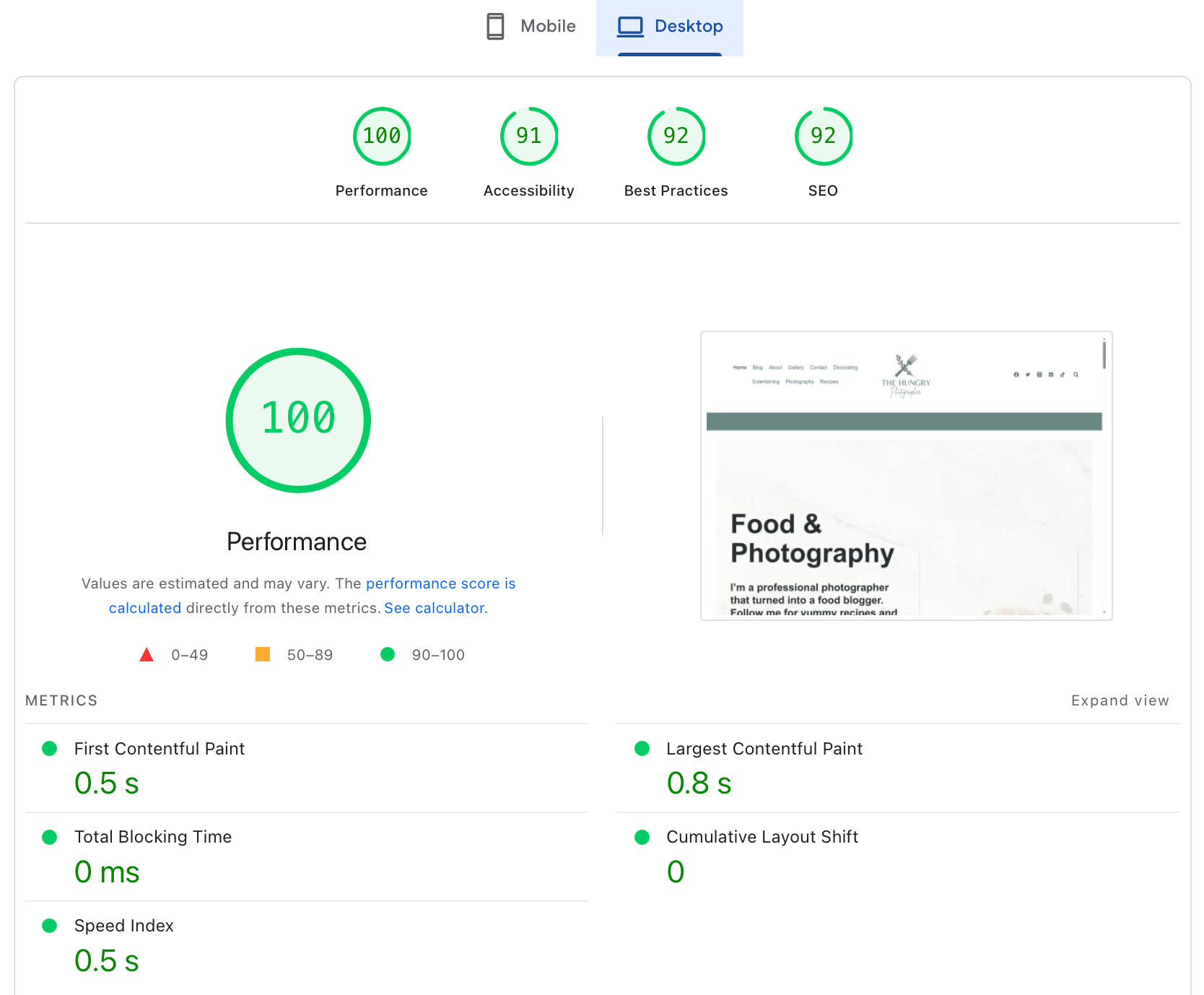
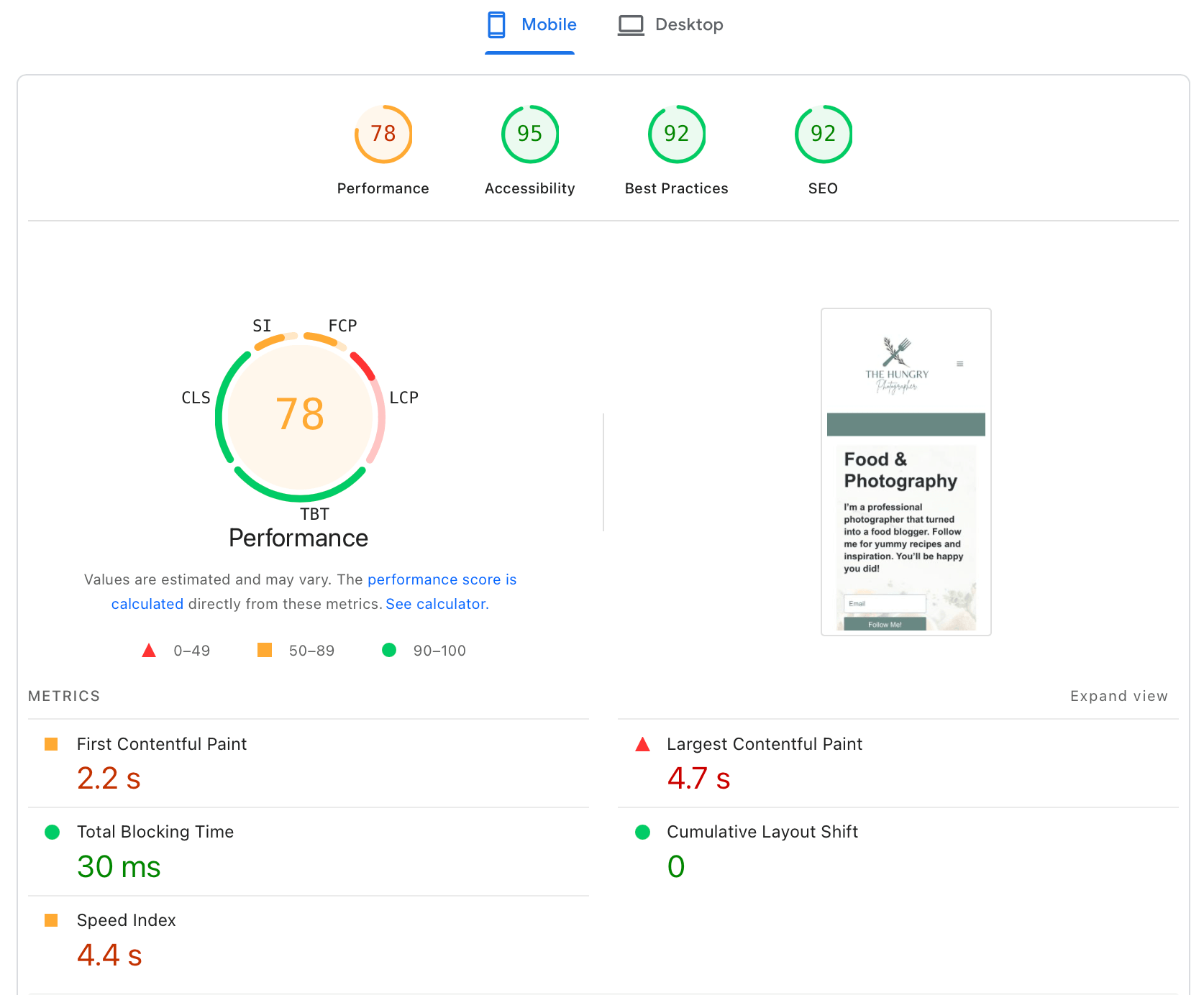
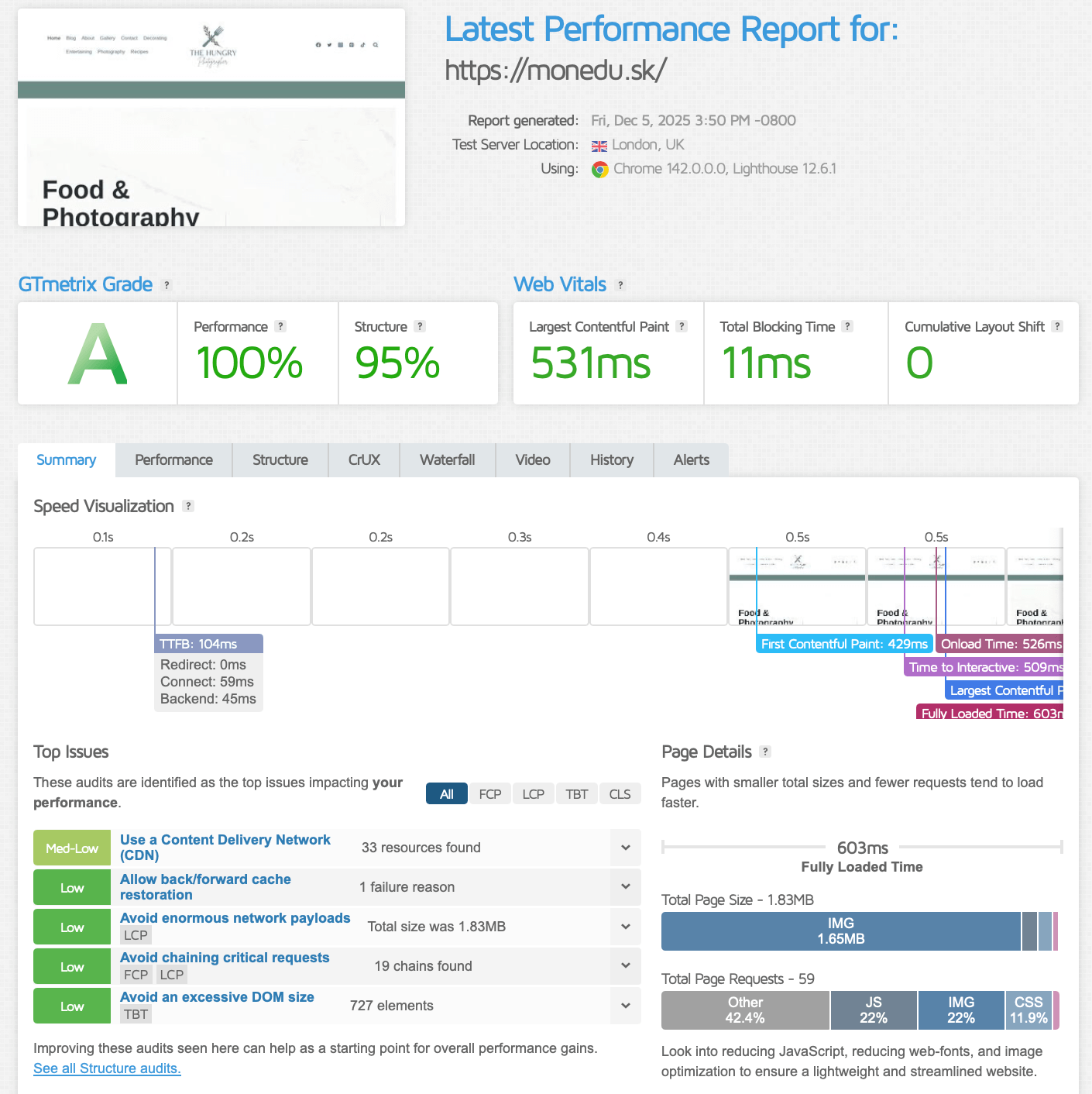
| Testing Tool | Desktop | Mobile | LCP | TTFB |
|---|---|---|---|---|
| Google PSI | 100 | 78 | 0,8 s | – |
| GTmetrix | A (100 %) | – | 531 ms | 104 ms |
Takeaway – Clean WordPress
The measured values are excellent: LCP stays comfortably under one second and TTFB hovers around ~100 ms, which indicates a very fast server response and no noticeable PHP processing bottlenecks.


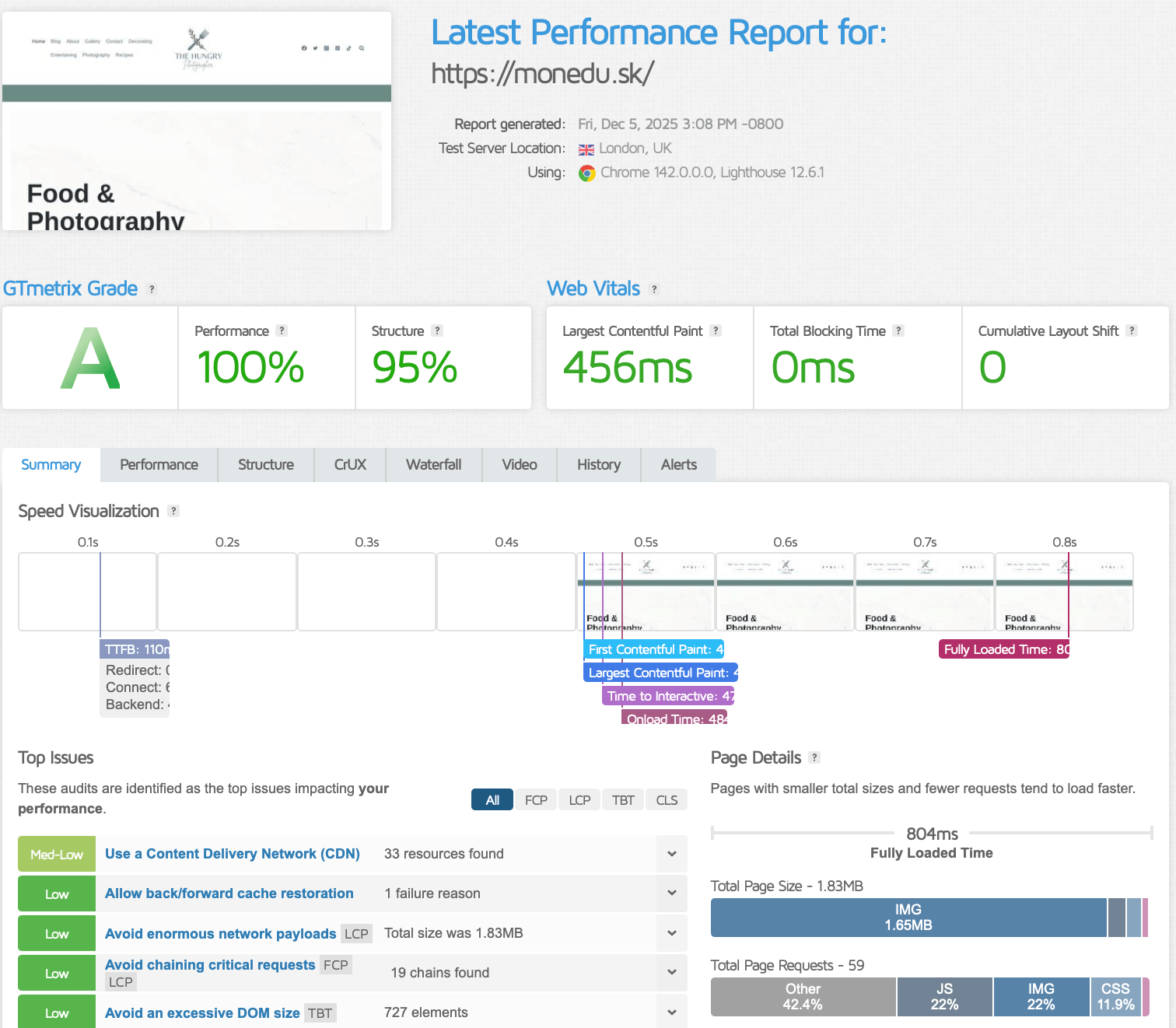
| Testing Tool | Desktop | Mobile | LCP | TTFB |
|---|---|---|---|---|
| Google PSI | 100 | 78 | 0,8 s | – |
| GTmetrix | A (100 %) | – | 456 ms | 110 ms |
Assessment – WooCommerce
WooCommerce didn’t slow the site down in any meaningful way. LCP is even slightly better than the clean setup, and TTFB remains in the excellent ~100–110 ms range-strong evidence that the platform handles typical e-commerce overhead well.
Application-Level Performance (WordPress Runtime & Database Response)
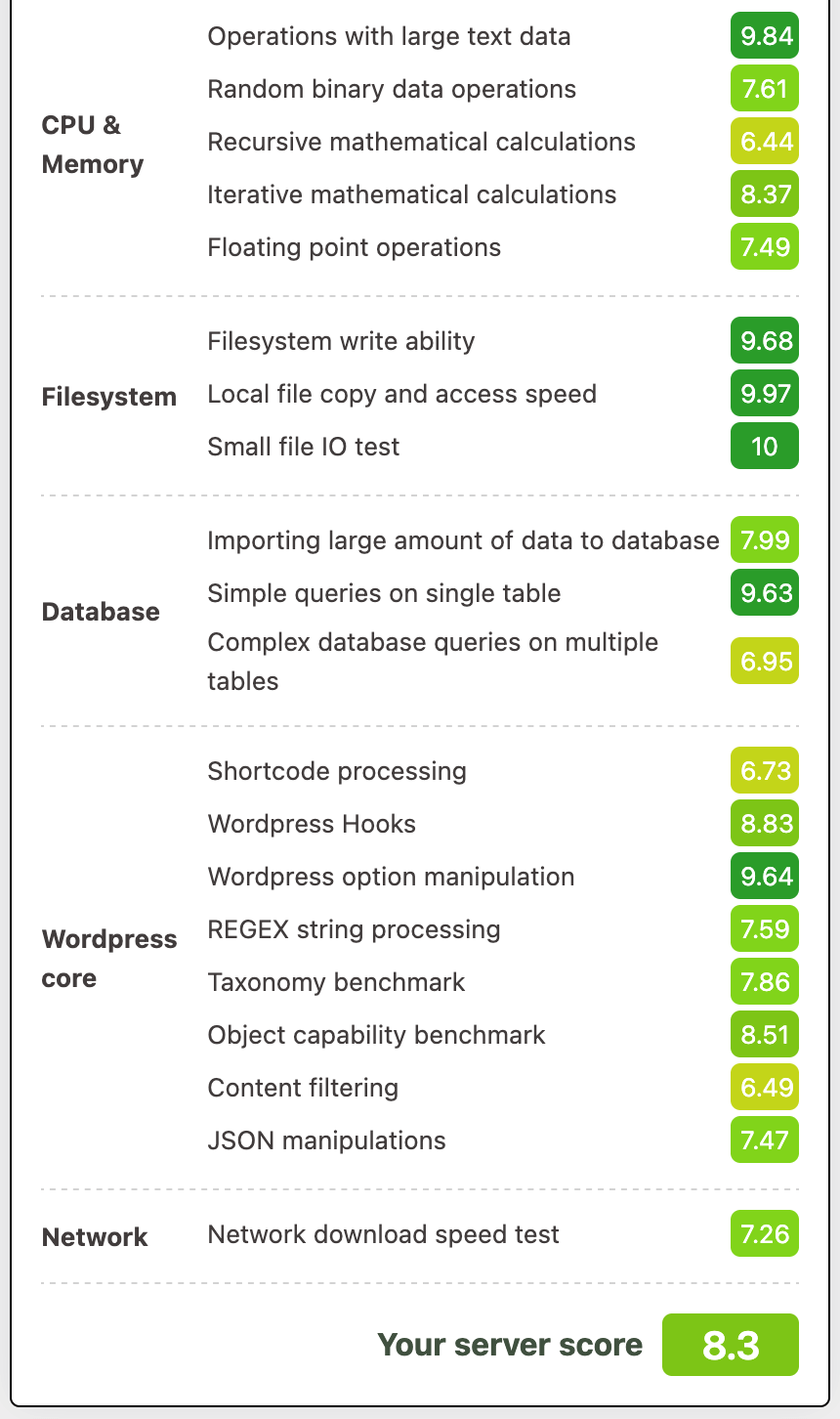
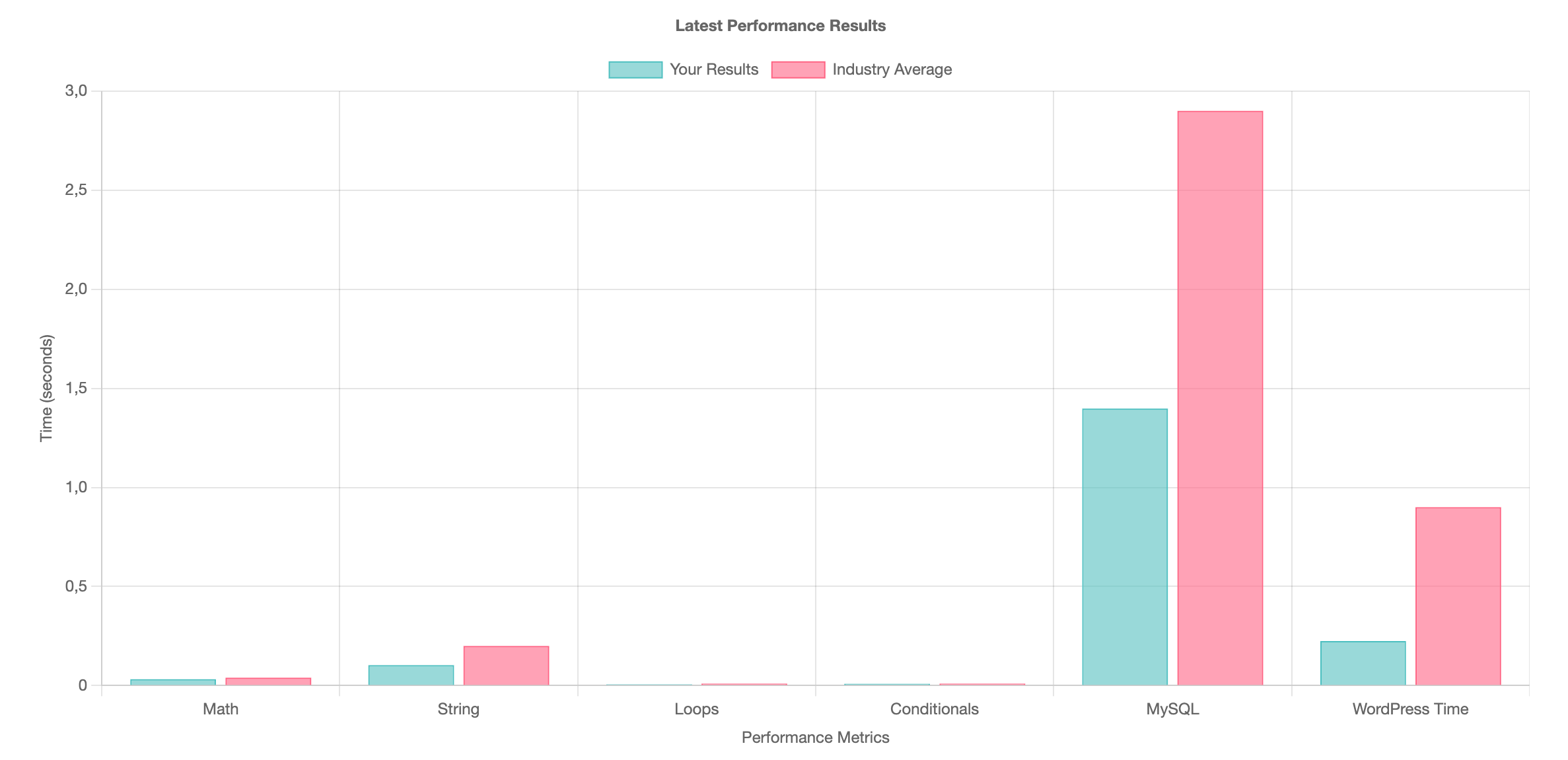
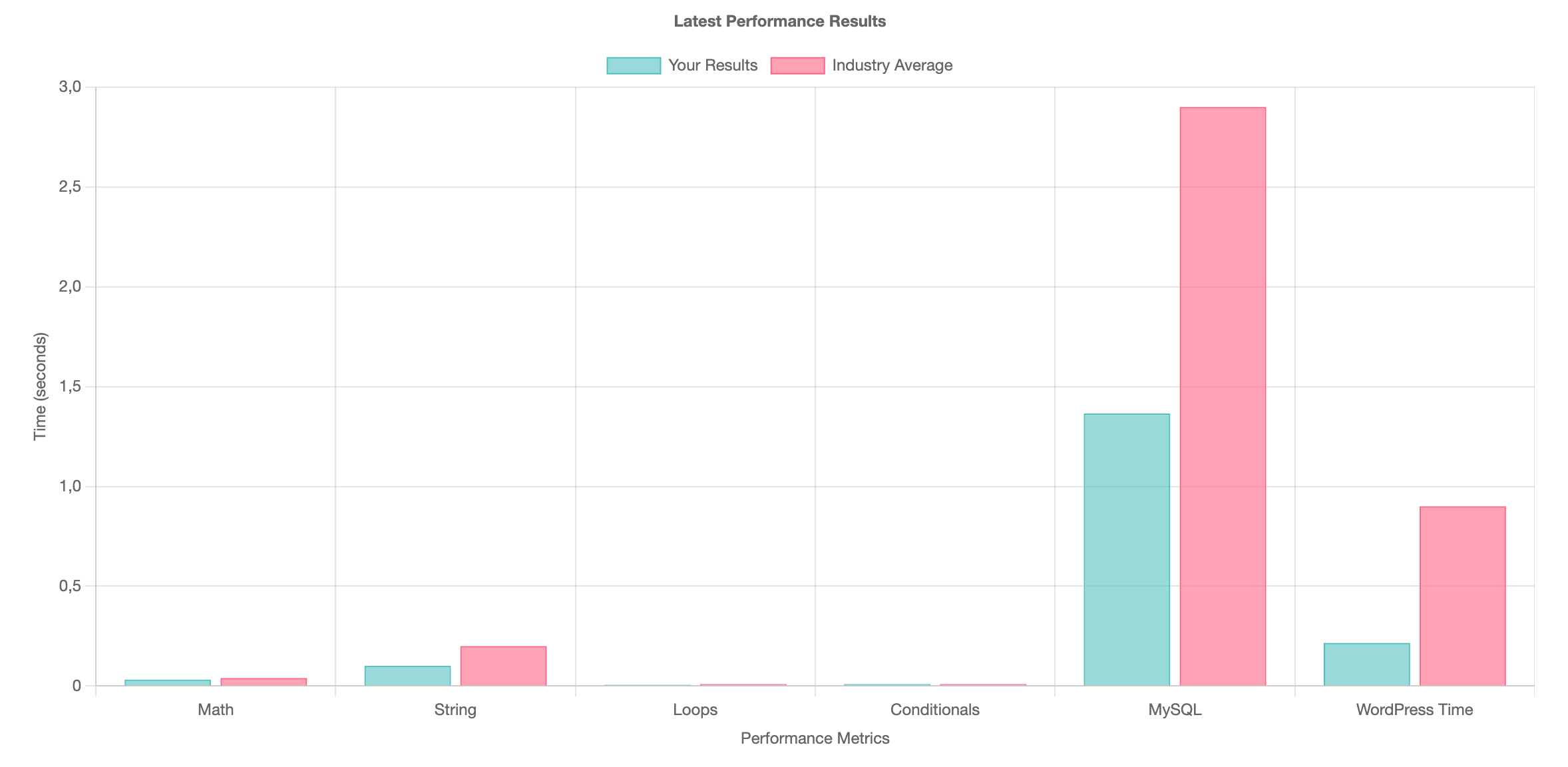
- CPU & Memory score: 8,3
- Filesystem score: 9,9–10
- Database score: 7,9–9,6
- WordPress core score: 7,4–8,8
- Overall score: 8,3

- Page generation time: 0,0517 s
- DB queries: 25 queries / 4 ms
- Peak memory usage: 6,9 MB
| Metric | Result |
|---|---|
| Page generation time | 0,052 s |
| SQL query count | 25 |
| DB time | 0,004 s |
| Overall WP Benchmark score | 8,3 |
Interpretation – Clean WordPress Runtime
Even with no caching layer, the installation remains extremely lightweight. Page generation sits around ~0.05 s, database overhead is minimal, and the overall behavior suggests plenty of headroom for a typical small business WordPress site.
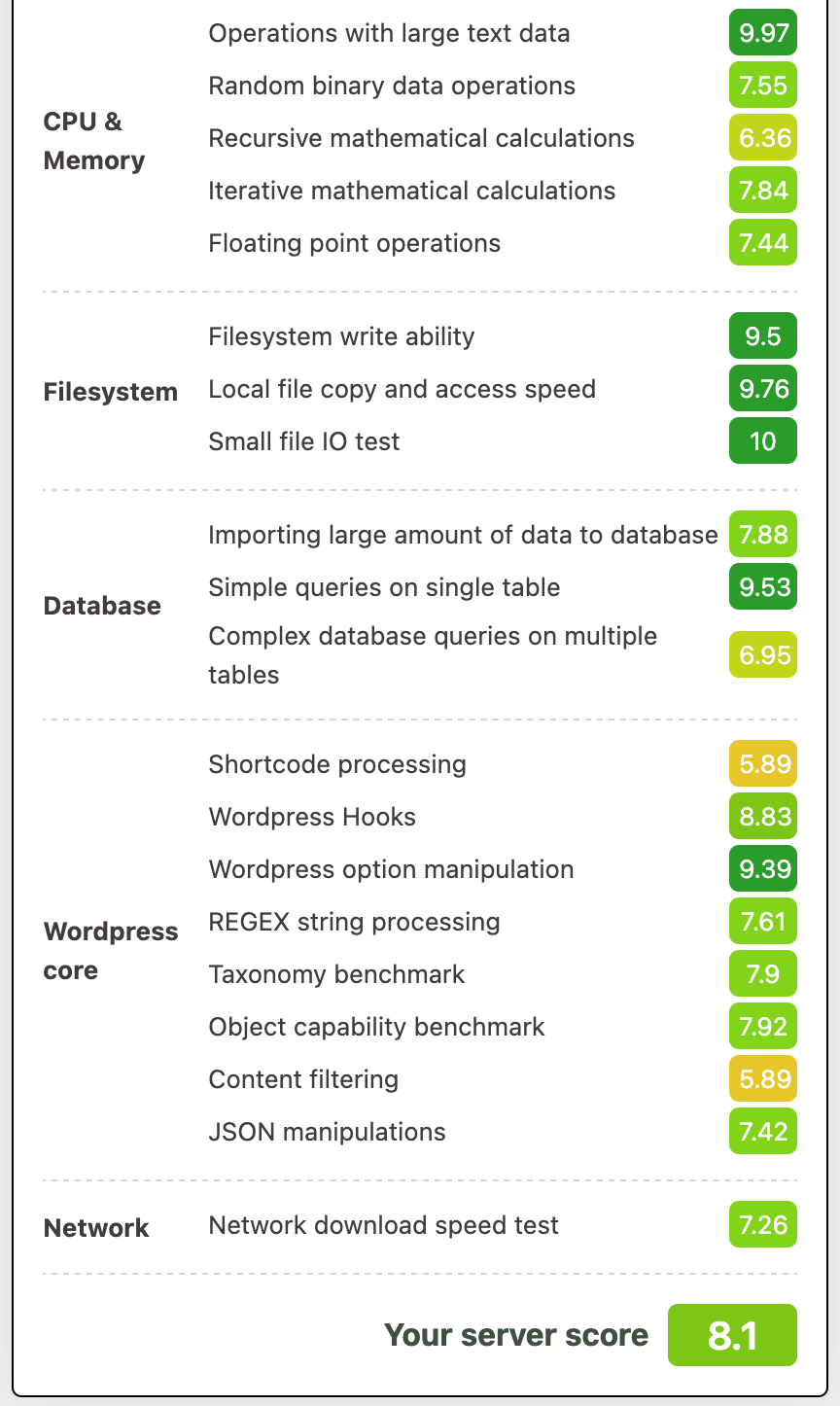
- CPU & Memory: 7,4–9,9
- Filesystem: up to 10
- Database: 6,9–9,5
- WordPress core: 5,9–9,4
- Overall score: 8,1

- Page generation time: 0,377 s
- DB queries: 4 queries / 0,0018 s
- Peak memory: 33 MB
- Redis hit rate: 98,1 %
| Metric | Result |
|---|---|
| Page generation time | 0,377 s |
| SQL query count | 4 |
| DB time | 0,002 s |
| Redis hit rate | 98,1 % |
| Overall WP Benchmark score | 8,1 |
What This Means – WooCommerce Runtime
WooCommerce does push memory usage higher, but with WP Fastest Cache and Redis enabled, response remains snappy and database time stays extremely low. Exactly what you want for a small store with a modest catalog.
Load Behavior Under Concurrency (k6.io)
Tests ran in three modes: Spike, Ramp-up, and Sustained load. For each test, I report P95 response time, peak RPS, and stability throughout.
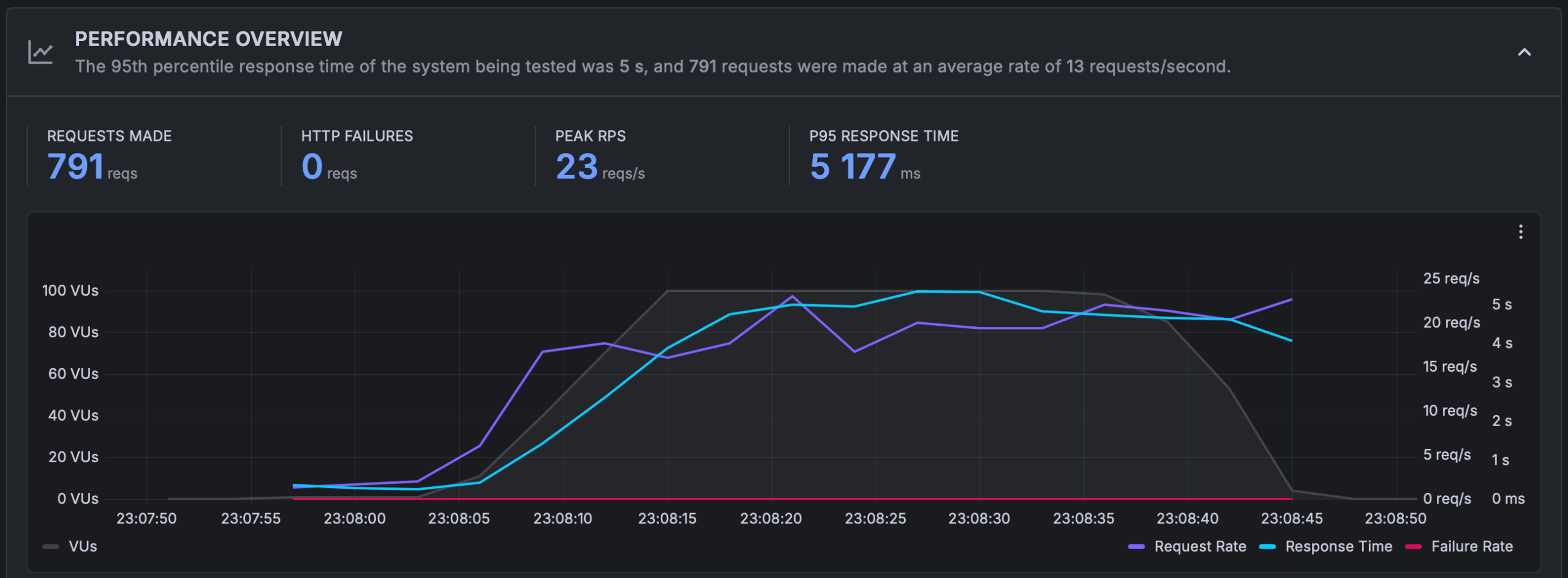
- Peak RPS: 23 req/s
- P95 response time: 5177 ms
- HTTP errors: 0
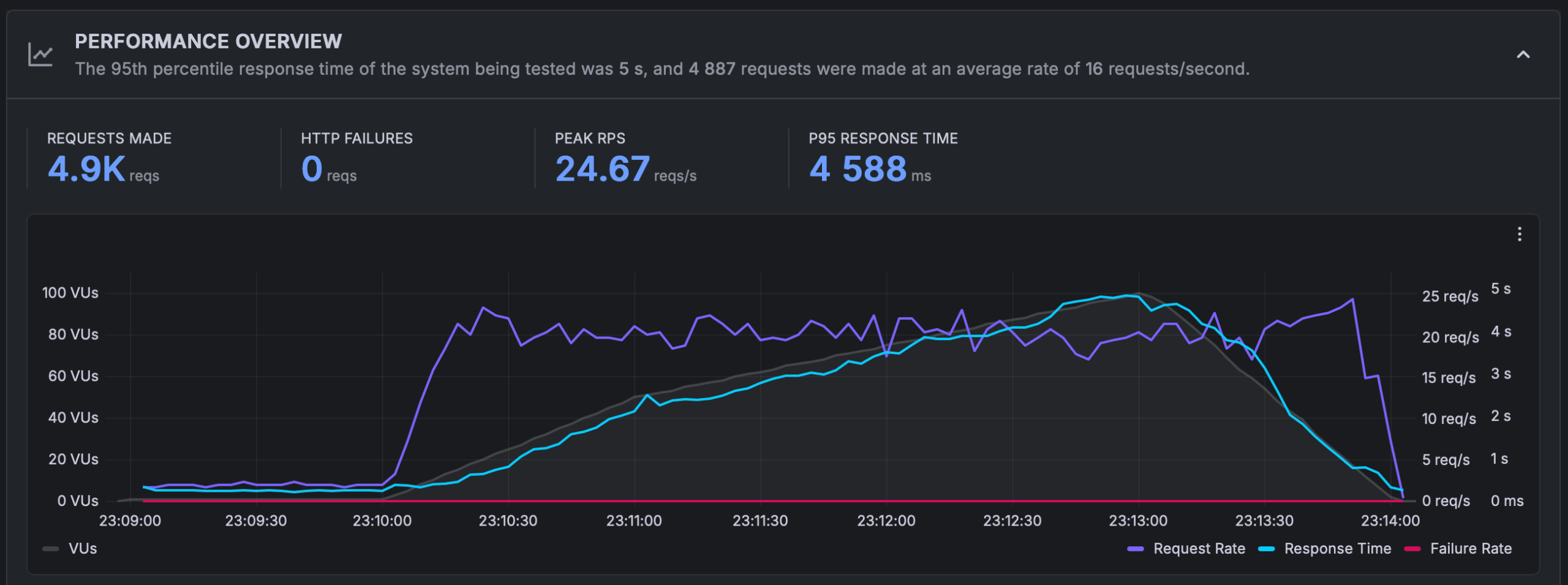
- Peak RPS: 24,7 req/s
- P95 response time: 4588 ms
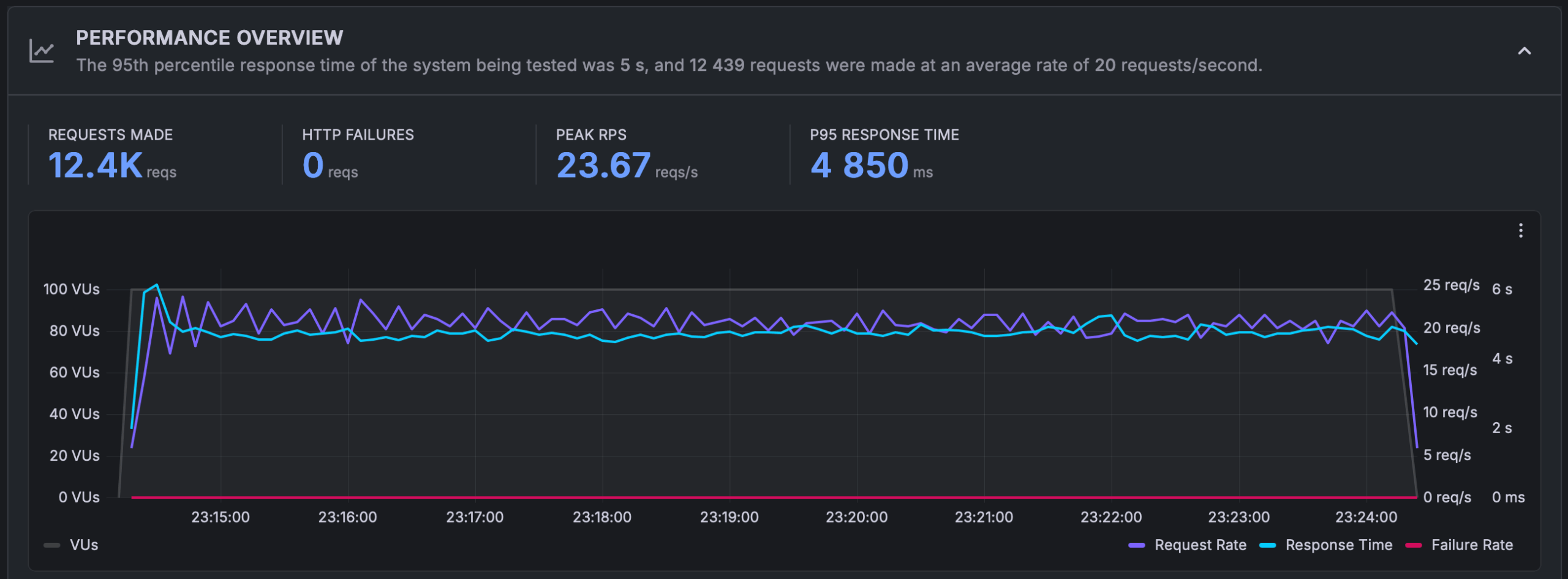
- Stable RPS: ~20 req/s
- P95 response time: 4850 ms
In Practice – Clean WordPress Under Load
The instance sustains roughly 20–25 requests per second without errors. During sudden spikes, latency rises into the 4–5 second range, which is typical behavior for a 1-vCPU plan when requests are predominantly uncached and CPU-bound.
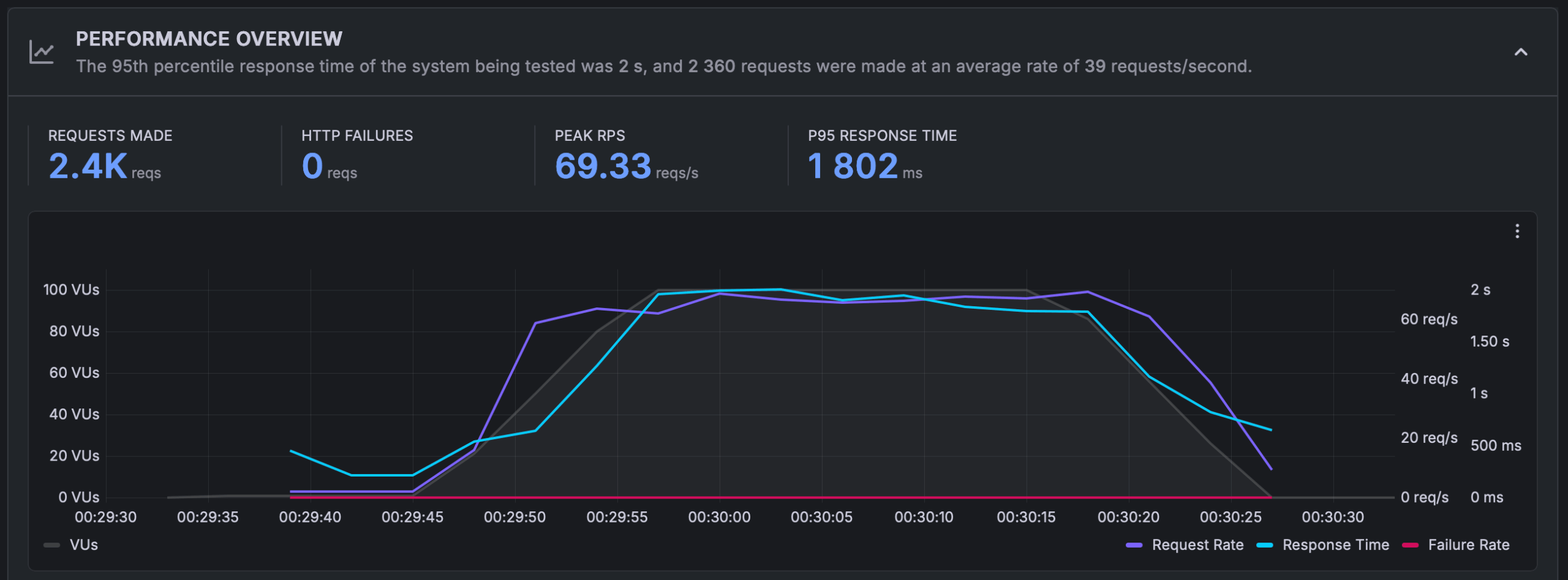
- Peak RPS: 69,3 req/s
- P95: 1802 ms
- HTTP errors: 0
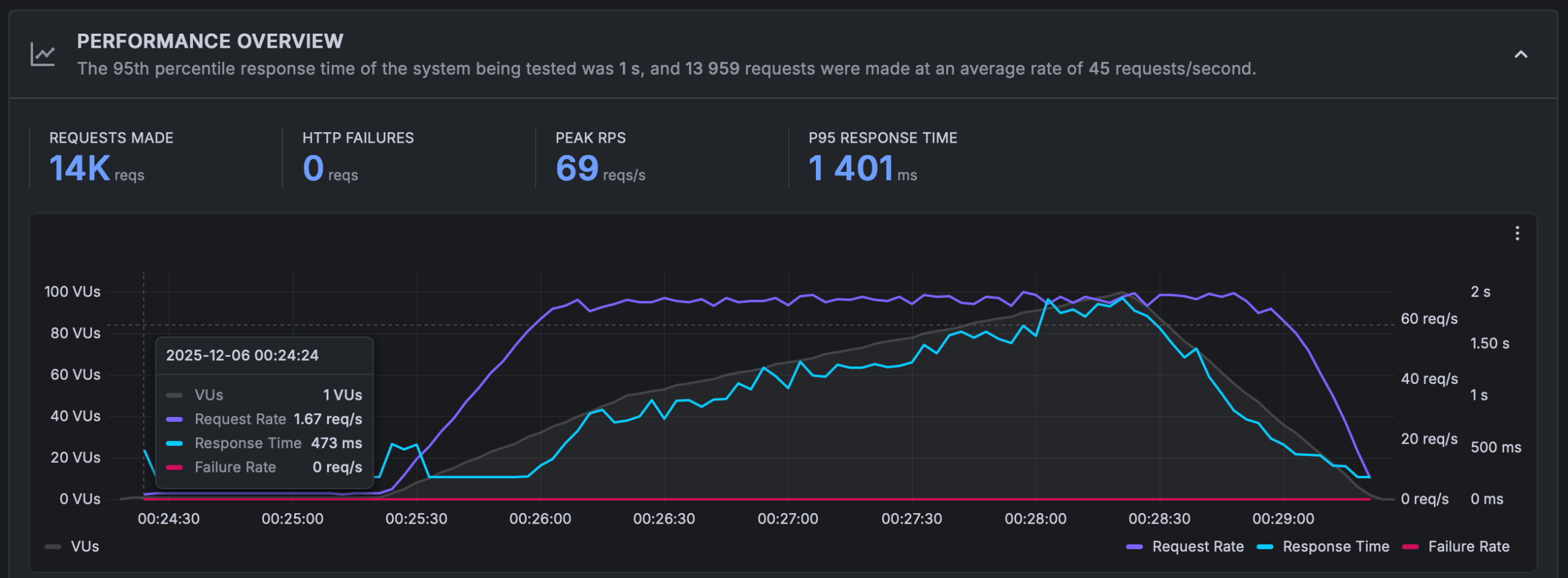
- Peak RPS: 69 req/s
- P95: 1401 ms
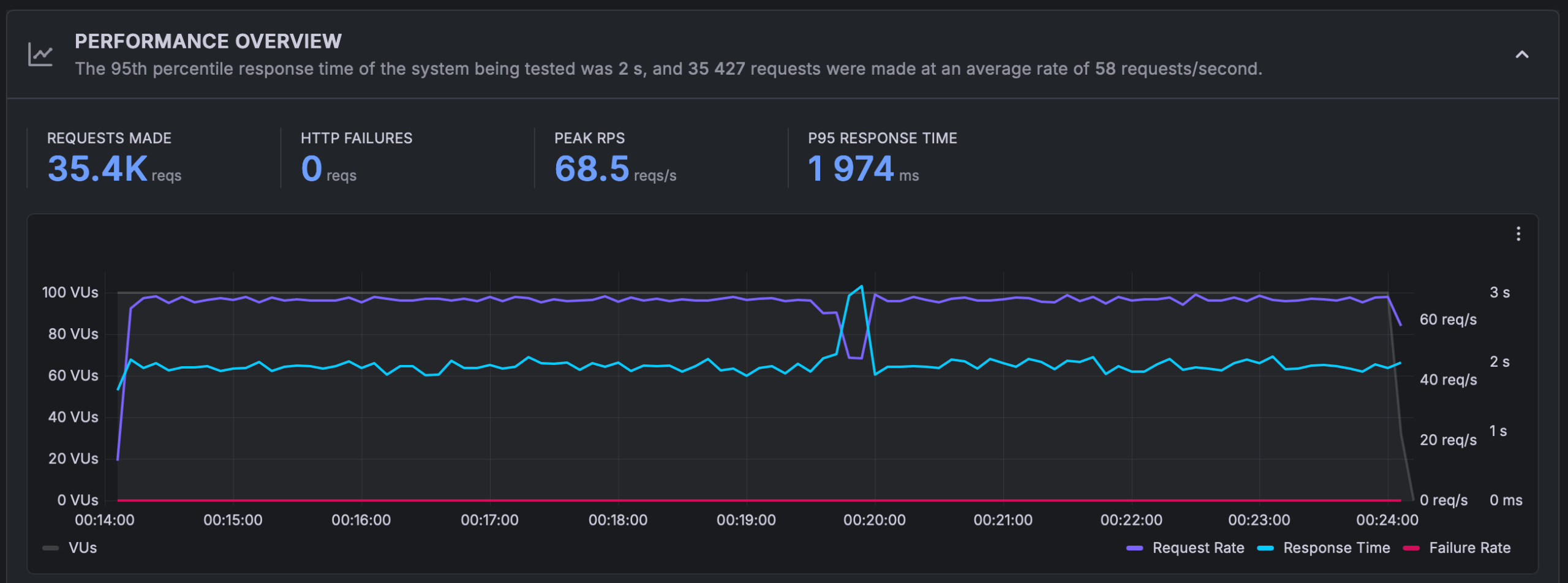
- Stable RPS: 68,5 req/s
- P95: 1974 ms
Validation – WooCommerce Under Load
Interestingly, WooCommerce performs better here than the clean setup because caching shifts the workload away from PHP and the database. The server nearly triples the served request rate, stays stable with zero errors, and keeps P95 roughly in the 1.4–2.0 s band-an excellent outcome for an entry-level VPS.
Network Throughput in Practice (Small vs. Larger Transfers)
Upload/download tests ran with multiple file sizes.
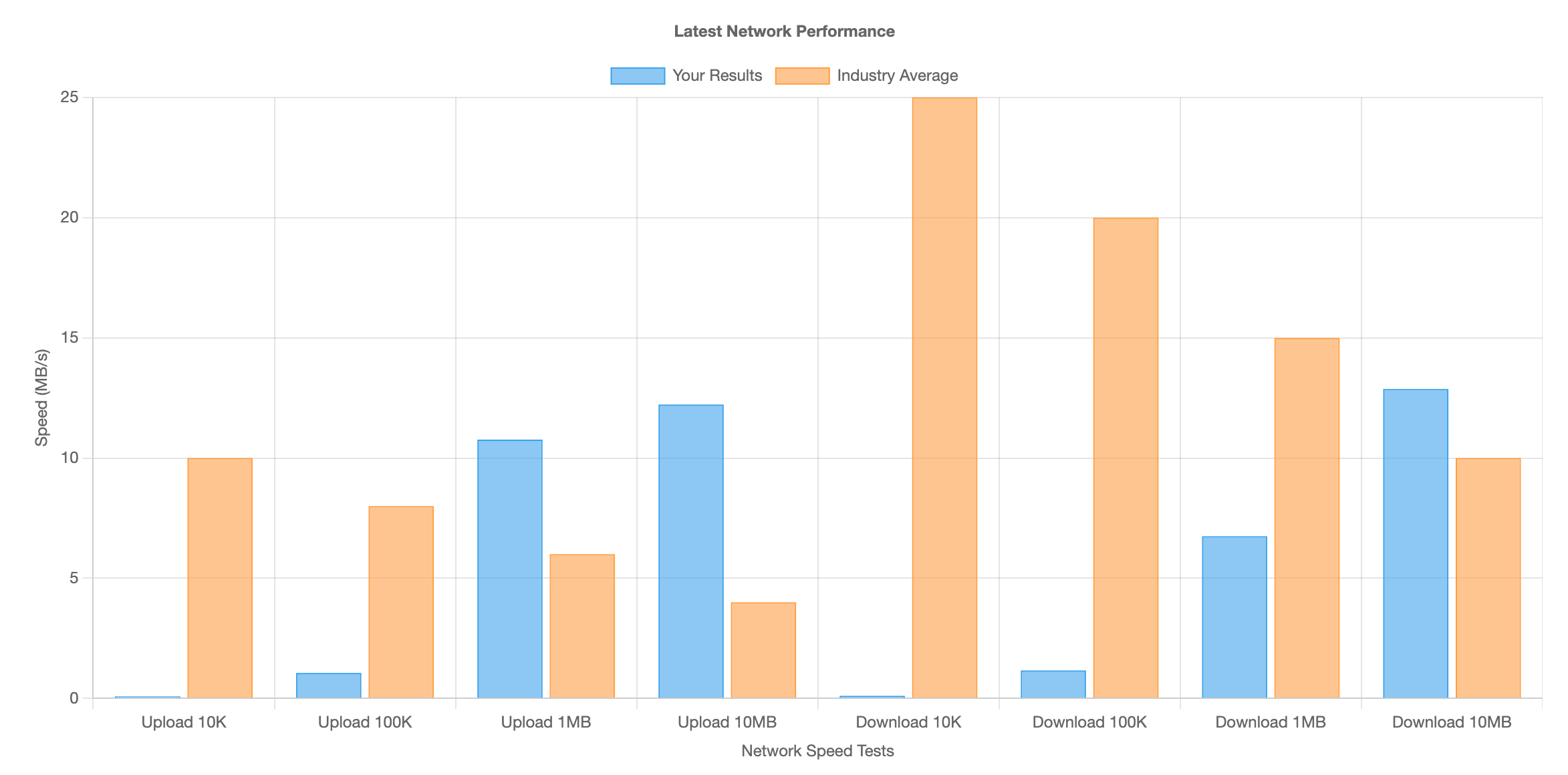
| Test | VPS Results | Average for VPS in this class |
|---|---|---|
| Upload 1 MB | 11 MB/s | 6 MB/s |
| Upload 10 MB | 12 MB/s | 4 MB/s |
| Download 1 MB | 6,5 MB/s | 15 MB/s |
| Download 10 MB | 13 MB/s | 10 MB/s |
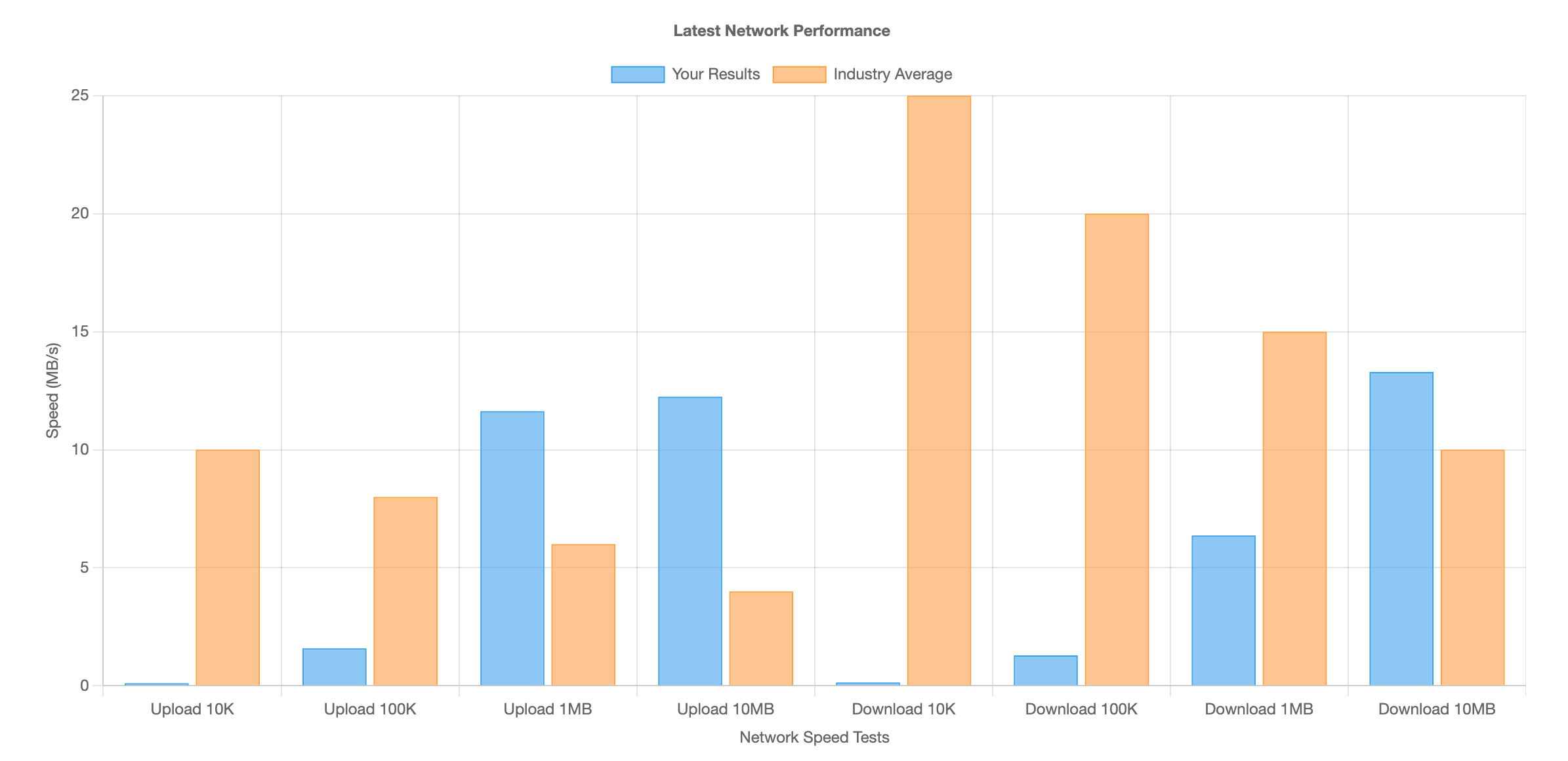
| Test | VPS Results | Average for VPS in this class |
|---|---|---|
| Upload 1 MB | 11 MB/s | 6 MB/s |
| Upload 10 MB | 12 MB/s | 4 MB/s |
| Download 1 MB | 6,5 MB/s | 15 MB/s |
| Download 10 MB | 13 MB/s | 10 MB/s |
Practical Takeaway
Upload speeds are above average for this VPS class. While downloads of very small files are slower, performance with larger transfers aligns well with standard expectations for entry-level European VPS plans.
Final Verdict: Coolhousing VPS START – Linux
The Coolhousing VPS pleasantly surprised me in testing. Despite being the entry-level tier, its performance ranks among the best VPS offerings in its price category. WordPress and WooCommerce ran smoothly, TTFB stayed around 100 ms, and thanks to caching, the server handled significantly higher load than I’d expect from 1 vCPU.
The AMD EPYC processor, fast NVMe storage, and low latency create a well-tuned combination that proved itself in both WordPress tests and synthetic benchmarks.
| Strengths | Weaknesses |
|---|---|
| + Excellent price-to-performance ratio | – External network throughput is rather standard |
| + Fast NVMe storage with very low latency | – 25 GB storage may be limiting for larger projects (e.g., WooCommerce with images) |
| + Stable AMD EPYC performance (strong single-core for PHP) | |
| + Free snapshots and simple management | |
| + Excellent WordPress and WooCommerce test results |
How Coolhousing Compares to Competitors
If you’re interested in a direct comparison with other Czech providers, I recommend the article “Windows VPS Comparison in the Czech Republic” that Coolhousing published on their website. It compares CPU performance, disk I/O, database operations, and RAM throughput across seven providers. The conclusion is fairly clear – higher price doesn’t automatically mean better performance, and Coolhousing’s new generation VPS performed very well in tests. My own Linux tests confirm this experience.
Conclusion
Coolhousing VPS START is a reliable, fast, and modern VPS that easily handles WordPress, smaller e-commerce stores, and business websites. Within its price category, it ranks among the higher-performing solutions, and thanks to simple management, snapshots, and solid infrastructure, it’s a very good choice for developers, small projects, and users who want quality VPS at an accessible price.
If you’re looking for a VPS with above-average performance and fair pricing, VPS START provided by Coolhousing is definitely a service worth trying.